
You’re a serious trader. You know the hard truth: you must journal your trades.
Quick answer: TradeZella has no free plan and no free trial — its cheapest plan starts at $35/month. Traders Journal has a free-forever plan, and premium is $12/month (₹499) with a 21-day trial — small refundable charge — if you want it. See the plans side by side on the Traders Journal pricing page.
You’ve read the playbooks, you follow the right mentors, and you’re treating trading like a business. That means every dollar of capital works twice as hard in the early days.
You look for a proper tool, land on TradeZella, see the dashboard… and then see there’s no free plan and no trial — just a $35/month bill from day one. It feels like it was built for traders who already “made it.”
I’ll go one step further. The price isn’t even the biggest issue. The real problem sits inside how modern journals are built.
Traders Journal: The TradeZella Alternative
If you’re comparing TradeZella against one serious challenger rather than scrolling a list of ten, this is the short version. Traders Journal does the things you’d switch for: automatic broker sync (Fyers, Zerodha, MetaTrader), screenshot and plain-English trade logging, a guided review step, a built-in backtester with bar replay, and NIFTY50 and BANKNIFTY data alongside NASDAQ, gold and forex majors.
The difference that matters most: TradeZella starts at $35/month with no free plan and no trial, while all of the above sits on Traders Journal’s free tier — no card, no time limit. Premium is $12/month (₹499), or $119 a year, if you outgrow it, with a 21-day trial that asks only a small refundable charge. The rest of this page is the evidence behind that claim, feature by feature.
Free Plan Comparison: Traders Journal vs. TradeZella vs. Stonk Journal
TradeZella has no free plan or free trial in 2026 — its cheapest tier starts at $35/month. Here’s how the free options actually stack up, whether you trade U.S. equities, forex, and gold, or Indian indices like NIFTY50 and BANKNIFTY.
| Feature | Traders Journal | TradeZella | Stonk Journal |
|---|---|---|---|
| Free plan | Free forever | None — plans start at $35/mo | Free forever |
| Cheapest paid plan | $12/mo (₹499/mo), or $119/yr | $35/mo (Essential) | $10/mo (Pro) |
| Paid trial | 21 days, small refundable charge | None — 14-day refund only | Free plan instead |
| Guided reflection on every trade | Yes — Detailed Mode | AI-generated summaries | Yes |
| Built-in backtester | Yes — 10 sessions a day free, unlimited on premium | Yes, paid plans only | Not available |
| Bar replay | Yes, on the free plan | Yes (1-sec precision), paid only | Not available |
| NIFTY50 / BANKNIFTY data | Yes | Not covered | Not covered |
| Broker auto-sync | Direct broker sync and MT4/MT5 terminals — covering 756+ brokers. 1 connection free, 25 on premium | 500+ brokers, paid plans | Not available (roadmap) |
| Screenshot & natural-language logging | Yes, on the free plan | Not available | Not available |
Pricing and features checked against TradeZella’s and Stonk Journal’s public pricing pages in July 2026. Confirm current details before switching tools, since plans change.
Other TradeZella alternatives at a glance
- TradesViz — free plan for stock journaling; backtesting across 35,000+ symbols is a paid-tier feature.
- Edgewonk — psychology-focused, no free plan; about $197 billed every 16 months with a 14-day refund guarantee.
- Stonk Journal — free forever like Traders Journal, but with no backtester or bar replay.
The Real Auto-Sync Trap: Capture Without Review
Automatic trade syncing is genuinely useful, and Traders Journal does it — connect Fyers, Zerodha or MetaTrader and your fills land in the journal on their own, read-only, without you retyping a single price. One connection on the free plan, twenty-five on premium. Because MetaTrader is the platform behind 756+ brokers worldwide, that one connection type covers most of the market — and for anything outside it, a CSV or broker statement import gets you there in a couple of clicks.
The trap was never the syncing. It’s treating a filled-in table as a finished journal. A synced row logs entry, exit, and R&R — it tells you what happened, never why it happened. Without the “why,” you repeat the mistake forever, no matter how clean the import was.
- Why did you take that entry? FOMO? Boredom?
- What was your state of mind? Calm or revenge trading?
- What was the exit logic? Rule-based or gut panic?
Your P&L is a lagging indicator. Your process is the only lead indicator. So let the machine do the typing, and spend the time you saved on the part it can’t do.
Capture Automatically, Review Deliberately
That’s the split Traders Journal is built around. Getting the trade in should be effortless — so you can auto-sync it, paste a screenshot of your broker fill and let it read the numbers off the image, describe it in plain English (“bought 100 TCS at 3400”), or drop in a CSV or broker statement. Five ways in, all on the free plan.
What stays deliberate is the review. Detailed Mode asks for five minutes of honest reflection so you confront your emotions, context, and trade thesis — the same discipline any good trading journal should build. TradeZella automates the capture too; the difference is what it asks of you afterwards.
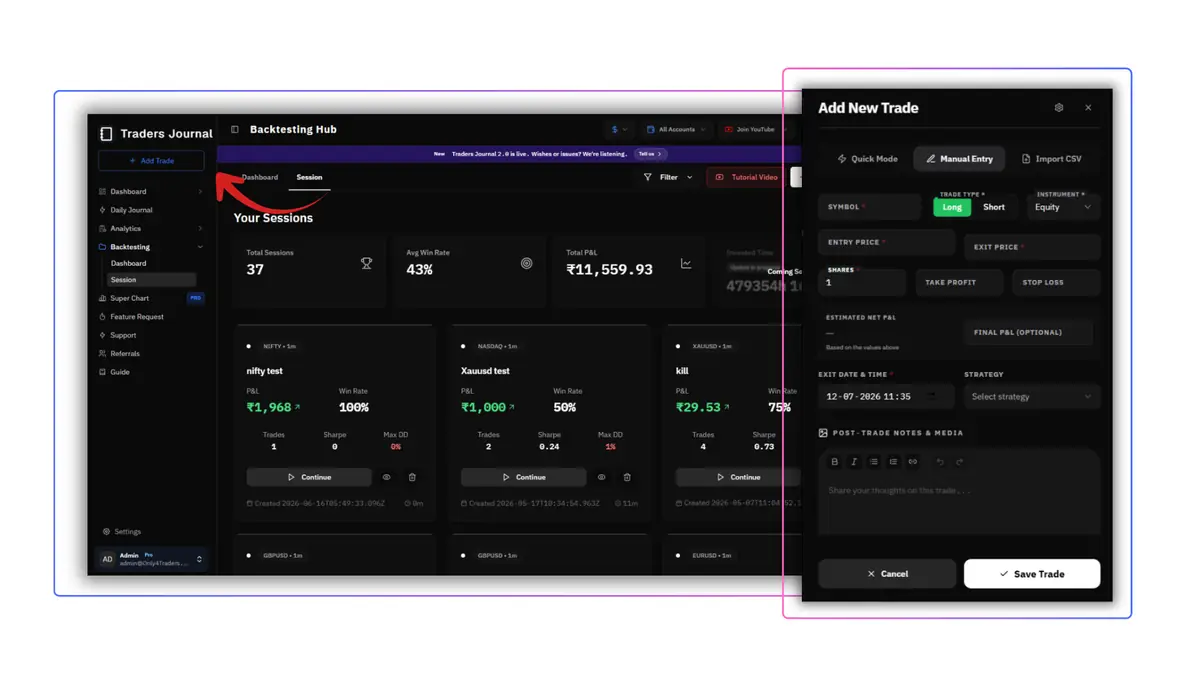
You can’t automate self-awareness. When you slow down to type the reason, the market conditions, and the management plan, you hardwire discipline.
Journaling Fixes the Mind. Backtesting Fixes the Strategy.
Let’s say the journal exposes your biggest flaw—cutting winners early. Now what? Most journaling-only apps leave you with “insight” and no tool to fix it.
- A Proven Strategy: statistical edge over hundreds of trades.
- A Disciplined Mind: the psychology to execute the rules flawlessly.
Backtesting builds the strategy. Journaling builds the mind. Why would you split them across two platforms and two subscriptions — or worse, pick a backtester with no journal attached?
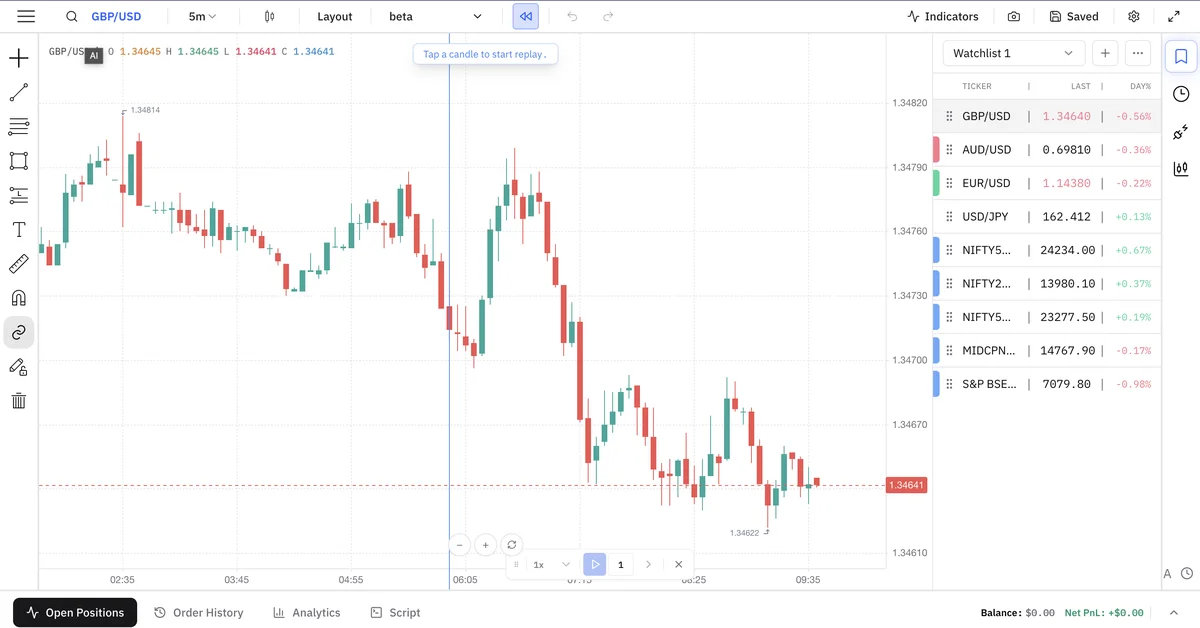
Inside Traders Journal, you backtest an idea for two years, trade it live, journal every execution, find a flaw (“My stop is too tight”), and loop back to the backtester instantly.
Global Markets, Including NIFTY and BANKNIFTY
Trade NASDAQ, gold, or forex majors? Most free journals cover you. Trade NIFTY50 or BANKNIFTY? Almost none do. Traders Journal is built for both — not a global tool with India bolted on as an afterthought, and not an India-only tool that ignores the rest of the world.
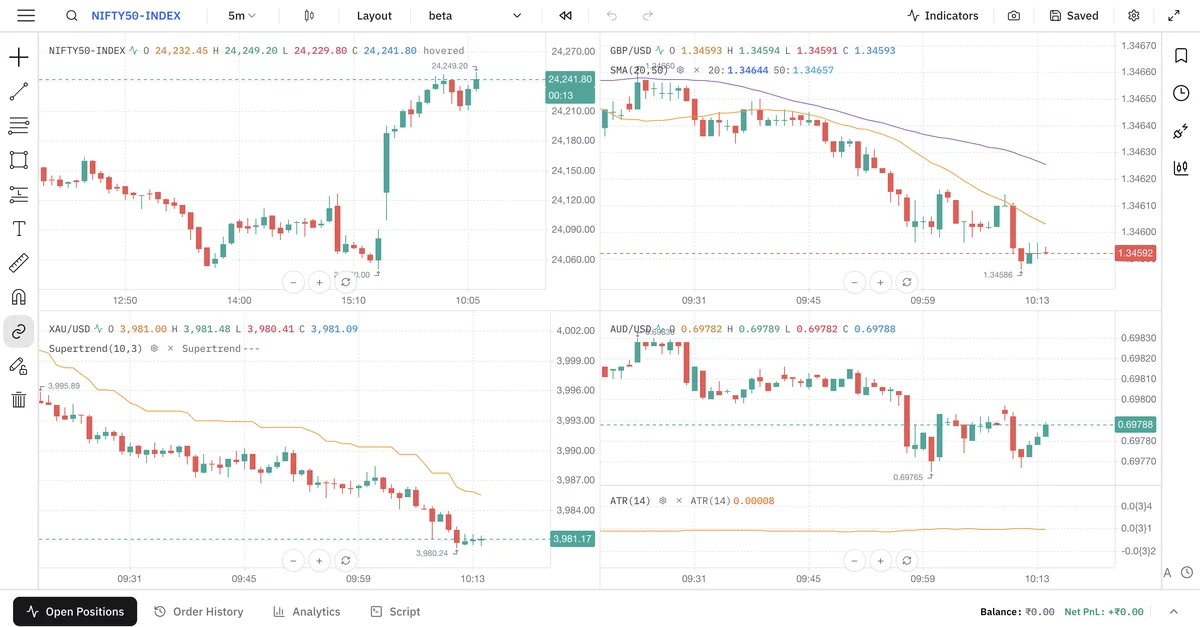
Our data stack spans NIFTY50, BANKNIFTY, XAUUSD, EURUSD, GBPUSD, and NASDAQ in the same workspace, so you’re not stitching together one tool for U.S. equities and another for Indian indices.
Whether you’re replaying the NASDAQ open with bar-by-bar precision or logging the mindset that led to a NIFTY trade, everything lives inside one clean workspace.
Want to see how more free options stack up before you commit? Our 3 best free trading journal software roundup compares Traders Journal against Stonk Journal and TradesViz in more depth.
So, Which One Should You Actually Use?
Think of it like the difference between a fitness tracker, a notebook, and a personal trainer. TradeZella is the fitness tracker — it logs every rep automatically (steps, calories, your trade history) but never asks why you skipped leg day or whether your form broke down halfway through. Stonk Journal is the notebook — free, honest, and useful for writing down what happened, but there’s no equipment attached to actually rehearse the fix. Traders Journal is the personal trainer: it still counts the reps for you — the sync, the screenshot reader, the CSV import all run automatically — then makes you explain the set in your own words and walks you to the practice room, the backtester, to run it again before you load real weight back on the bar.
Pick TradeZella if: your broker offers neither a MetaTrader bridge nor a clean statement export, you need it synced natively from TradeZella’s own 500+ broker list, you don’t mind paying $35+/month from day one, and you prefer AI-generated summaries over writing your own reflections.
Pick Stonk Journal if: you want a completely free, no-frills log and don’t need backtesting or bar replay yet — just clean, unlimited manual entries.
Pick Traders Journal if: you want the full loop — trades captured for you by auto-sync, screenshot or CSV import, a review step that builds real self-awareness, a built-in backtester to immediately test the fix, and market coverage that doesn’t stop at your home exchange. All on the free plan.
There’s no universally “best” journal — there’s the one built for the stage you’re actually at. If that’s “I know I need to journal and backtest, and I don’t want to pay $35 a month to find out if the habit sticks,” that’s exactly the trader Traders Journal was built for.
Ready When You Are
Traders Journal is free because we’d rather earn your trust than your card details. No trial clock, no paywall waiting at trade ten — just the workflow, whenever you’re ready for it.
It comes down to two things:
- Testing your strategy.
- Understanding your mind.
If that’s what you’ve been missing, logging your first trade takes about five minutes.
Frequently Asked Questions
01Is TradeZella free to use?
No. TradeZella has no free plan in 2026 — every feature sits behind a paid subscription starting at $35/month (Essential), rising to $59/month (Pro) and $99/month (Ultra) for higher account limits and AI features. Traders Journal's core journaling and backtesting stay free indefinitely.
02Does TradeZella offer a free trial?
No trial either — you pay from the moment you sign up. The closest thing is a 14-day money-back refund if you request one, which isn't the same as trying it first. Traders Journal skips this problem entirely: the free plan has no time limit and no card is required to start.
03How much does TradeZella cost?
TradeZella has three paid tiers: Essential at $35/month ($26/month billed annually), Pro at $59/month ($44/month annually), and Ultra at $99/month ($74/month annually). Traders Journal's equivalent premium plan is $12/month (₹499/month), or $119 billed annually — roughly a third of TradeZella's entry tier — and there's a free plan at no cost plus a 21-day premium trial for a small refundable charge.
04What is the best free alternative to TradeZella?
Traders Journal is a 100% free alternative that pairs automatic trade capture — direct broker sync plus MT4/MT5 terminal sync across 756+ brokers, along with screenshot reading and CSV import — with a guided review step, a built-in backtester and bar replay. TradeZella only unlocks backtesting on its $35+/month plans, and doesn't cover NIFTY50 or BANKNIFTY data.
05Does Traders Journal sync with my broker automatically?
Yes. Traders Journal pulls fills into the journal through direct broker sync and MT4/MT5 terminals — read-only, so it can never place an order. Together these cover 756+ brokers. The free plan includes one automated connection and premium allows 25. For anything outside that, you can import a CSV or broker statement, paste a screenshot of your fills and let it read the numbers off the image, or describe the trade in plain English.
06Can I log a trade from a screenshot?
Yes, and it's on the free plan. Paste or attach a screenshot of your broker fill or chart and Traders Journal extracts the trade fields from the image, marking which values it read from the picture and how confident it is so you can correct anything before saving. TradeZella has no equivalent — it relies on broker connections and manual entry.
07Is there a free trading journal with backtesting built in?
Yes — Traders Journal includes backtesting and bar replay on its free plan: 10 sessions a day with unlimited trades in each, and 5 indicators per chart. Premium lifts that to unlimited sessions and 25 indicators. Most competitors, including Stonk Journal, either don't offer backtesting at all or lock it behind a paid tier.
08What are the best alternatives to TradeZella overall?
Beyond Traders Journal, other names that come up in TradeZella comparisons include TradesViz (free plan for stock journaling, with backtesting across 35,000+ symbols on paid tiers) and Edgewonk (psychology-focused, about $197 billed every 16 months with a 14-day refund guarantee). Most alternatives split into automated-and-expensive or manual-and-limited — Traders Journal's free plan is the one that keeps backtesting included.
09Does TradeZella support Indian markets like NIFTY and BANKNIFTY?
No, TradeZella's broker integrations and data are built around global brokers and don't cover NIFTY50 or BANKNIFTY. Traders Journal covers both indices alongside XAUUSD, EURUSD, GBPUSD, and NASDAQ in the same workspace.
Ready to log your next session?
Start your Traders Journal workspace and build a cleaner review habit.
Start for freeKeep reading
View all articles
ThinkorSwim Backtesting: thinkBack, OnDemand & Custom Strategies
ThinkorSwim actually has three backtesting tools, not one. Here's what thinkBack, OnDemand, and Custom Strategies each do, where they fall short, and a no-code alternative.
How to Backtest a Trading Strategy Without Coding (Step-by-Step)
Five steps to backtest a trading strategy with no Pine Script and no spreadsheet from scratch — writing fixed rules, picking data, running it bar by bar, and reading the results honestly.

MT4 Backtesting Report: How to Read It (And When to Skip It)
How to read an MT4 backtesting report — profit factor, drawdown, modeling quality — and when a manual or no-code backtester fits your strategy better than MT4's tester.