Quick answer: if you already trust your strategy and just want deeper replay, prop-firm practice, and futures-grade data, FX Replay Pro is the better fit. If you're still building the testing-and-journaling habit — or want that habit for free — Traders Journal's free plan already out-limits FX Replay's paid Intermediate tier.
Searching for an FX Replay alternative usually means you already opened FX Replay and hit a wall — it's built for traders refining an edge they trust, not traders who don't have one yet but want a low-barrier way to start learning.
A forex trading simulator — FX Replay, Traders Journal, or anything else — has one job: let you take a trade with zero money on the line, then be honest about why it worked or didn't. Not a demo account you forget about in a week. Not a chart you just stare at. A real rewind button — and then a harder question: would you take that same trade again, now that you know how it ended?
Most traders never even reach that question. They get stuck one step earlier: "which tool do I even use for this?" That's worth slowing down for, before any brand name shows up.
FX Replay, quick take
- Good for: traders who already trust a strategy and want deeper reps, prop-firm practice, futures-grade data.
- Watch out for: the 5-day trial needs a card and auto-charges after; journal is single-tag and opens in a separate window.
Traders Journal, quick take
- Good for: traders still building the testing-and-journaling habit, or who want more of it for free.
- Watch out for: no dedicated prop-firm evaluation mode yet.
What You Actually Need From an FX Replay Alternative
This backtesting session shows how historical candles, simulated trades, and results come together before real money is at risk.
Think about the last time you actually prepared for an exam that mattered. You didn't just read the textbook once and hope. You solved old question papers. You sat full-length mock tests under a timer, the way the real thing would feel. And afterward — this is the part everyone skips — you went back and checked exactly where you lost marks, and why.
A forex trading simulator is supposed to be that same mock test, except the subject is your own trading. Whether you call the practice part "replay" or "backtesting" doesn't really matter — people use those words differently, and it's not worth arguing about. What matters is simpler: can you actually sit the "exam" enough times, on real price action, before your real money is the one at risk? And once you've sat it, do you go back and check your answers — or does the whole lesson vanish the moment the session ends?
Here's the part most people quietly skip, and it's the only part that actually changes anything: after the mock test, you don't just look at the score. You look at the specific question you got wrong, and you ask why. Maybe you rushed. Maybe you misread it. Maybe you knew the answer and still picked the wrong one, which is its own special kind of pain. In trading, that's your journal. It's not extra homework tacked onto the real work. It's the only step that stops next month from repeating this month's mistake wearing a different excuse.
A real forex trading simulator needs to give you both halves of that mock-test habit — a proper way to test your setup, and a place to actually write down what you got wrong and why. A tool that only replays price and never asks you to write anything down is a mock test with the answer key ripped out. You'll feel busy. You won't actually get better.
Here's the honest checklist before you spend any money at all:
- Is your sample size big enough to mean anything? A handful of good trades proves nothing. You need real range — trending stretches, dead stretches, volatile ones. Give it at least 3 to 5 years of data before you trust a rule with real money.
- Is your journal a record of experience, or just a scoreboard? Win and loss columns tell you what happened. They don't tell you why. A real journal is a curated record of your own reasoning — the setup, the thought, the mistake — not just green and red numbers stacking up.
- Have you actually repeated it enough to trust your own hands? Bruce Lee never said he feared the man who practiced 10,000 different kicks. He feared the one who practiced one kick 10,000 times. Confidence in trading works the same way — it doesn't come from a guess. It comes from doing the same thing enough times that your own stats can back you up instead of your gut.
- Can you actually afford to use this long enough to find out if it's working? Most people skip this question. It's the one that decides everything else.
If a tool gives you a great mock test but no way to review your mistakes, you'll learn fast in week one and nothing after week four — right around the time the bill shows up again.
How We Compared: FX Replay vs Traders Journal
Here's the honest starting point: if you're weighing Traders Journal as an FX Replay alternative, you shouldn't have to pay for two tools just to find out which one actually fits you. So we did the boring part for you — we opened both, used both, and checked every claim against what the platforms actually show on their own pages, on July 10, 2026. Prices and features move, so if something's changed by the time you're reading this, trust what's on their site over what's on ours. We've run FX Replay through this same process before, in our wider no-code backtesting software comparison, so this isn't our first look at it.
But here's the thing worth saying plainly before you read a single feature comparison: a fish that's bad at climbing trees isn't a bad fish. It's just not a monkey. FX Replay wasn't built for the same person Traders Journal was built for, and that's not a flaw in either one — it's the whole point. We're not going to spend this post quietly highlighting everything FX Replay doesn't have, like that proves something. It proves that it wasn't built to be us, the same way we weren't built to be it.
So the real question running under every section from here isn't "which tool wins." It's "which one was actually built for the situation you're in right now." That's not a checklist you can tick off once and be done with — it changes depending on what you already know about yourself. A trader who's already confident in their setup and just wants more reps needs something different from a trader who still isn't sure their setup is a setup at all. Same market, same word — "simulator" — completely different job depending on who's asking.
Keep that in mind as we go through this. We're not building toward a scoreboard. We're building toward you knowing which one is actually yours.
Who FX Replay Is Actually Built For
You don't reach for an axe to cut vegetables, and you don't reach for a kitchen knife to cut down a tree. Both are good tools. Neither is the wrong tool — they're just built for a different job, and FX Replay knows exactly which job it's doing.
Here's the trade every trader eventually has to make: you pay the market with your time, or you pay it with your money. Paying with time means sitting down, testing, journaling, and slowly getting better at reading your own mistakes. Paying with money means skipping some of that and hoping it works out — which, if you've been trading for more than a week, you already know rarely does.
FX Replay isn't built for the trader still deciding what their strategy even is. It's built for the trader who's already past that — someone above breakeven, who's picked a strategy, and now wants to polish it. Not "does this work at all," but "where exactly does this break, and can I make it sharper across more than one symbol at a time." That's a different, later-stage question, and FX Replay answers it well.
That's exactly why its strongest features look the way they do. Multi-chart sessions across up to 8 charts and 5 symbols exist because correlated-pair testing is a real, specific need — but only once you already have a rule worth testing across pairs. Sixteen-times replay speed exists to save time for someone who's already run this drill enough to know what to skip. The Prop Firm Simulator exists because prop evaluations are a real next step for a trader who's already proven something to themselves. None of this is filler. It's a tool built end-to-end for a trader who's above intermediate, working toward pro, and needs to stress-test an edge they already believe in.
That same focus is also where the edges show. FX Replay isn't built for tick-level precision or complex custom order-flow work — that's a different, more advanced tier of tooling entirely. Its journaling exists too, but it's trade-by-trade only — there's currently no way to leave a note for the session as a whole — and it lives in its own separate window with just one tag category, so it takes more effort to build into an actual review habit. None of that is a flaw. It's just not what this tool was built to do. FX Replay's own positioning is honest about this too — spend real time on it, and the promise is a sharper edge on a strategy you've already found, not a strategy handed to you from scratch.
So if you're the trader this was built for — strategy decided, already above breakeven, looking to invest in yourself and sharpen an edge you've already found — FX Replay is doing exactly its job, and doing it well. One practical thing worth knowing: FX Replay is browser-based only, while Traders Journal also has a mobile app for reviewing a trade or checking a session away from your desk.
Traders Journal: The Whole Loop, Not One Piece of It
Think about mock tests again. One good mock test doesn't mean you're ready. What matters is this: do you keep taking them, keep checking exactly where you lost marks, and actually fix that one thing before the next test? Skip that part, and you could sit ten mock tests and still walk into the real exam with the same mistake waiting for you.
Trading works the same way, once you decide to actually take it seriously. Traders Journal is for anyone putting in real effort to get better — whether you're just starting out and want to learn the right way from day one, still figuring out why you keep losing, or already making some money but not yet sure it'll last. Doesn't matter which one you are. What matters is you're still willing to test your ideas and learn from your own mistakes instead of just moving on to the next trade and hoping. That's exactly why this is built as a loop and not a single feature — because "getting better on purpose" was never going to fit inside one tool.
Two features exist to keep that loop closed, built for different moments in it.
Dedicated backtesting is for when you've already narrowed down to one real idea and you're ready to build the actual case for it. You take the trade and add your thought process in the same motion — no separate window, no switching context halfway through the thought. Even in replay, you can still take an invalid trade or miss a confluence you should've caught — that's normal, it happens to everyone. Individual session stats catch exactly that, so you're improving one specific thing at a time, not vaguely "getting better" at everything at once.
SuperCharts is for the moment before that — when you've got a hunch and just want to know, fast, whether it's even worth narrowing down. It's a TradingView-style bar replay across a large list of instruments, built for scanning wide: does this hold up on gold, on Nifty, on three different pairs, before you commit real testing time to just one? Journaling here is old-school by design — your own notes on the side, not a structured record — because at this stage you're still exploring, not yet building a case.
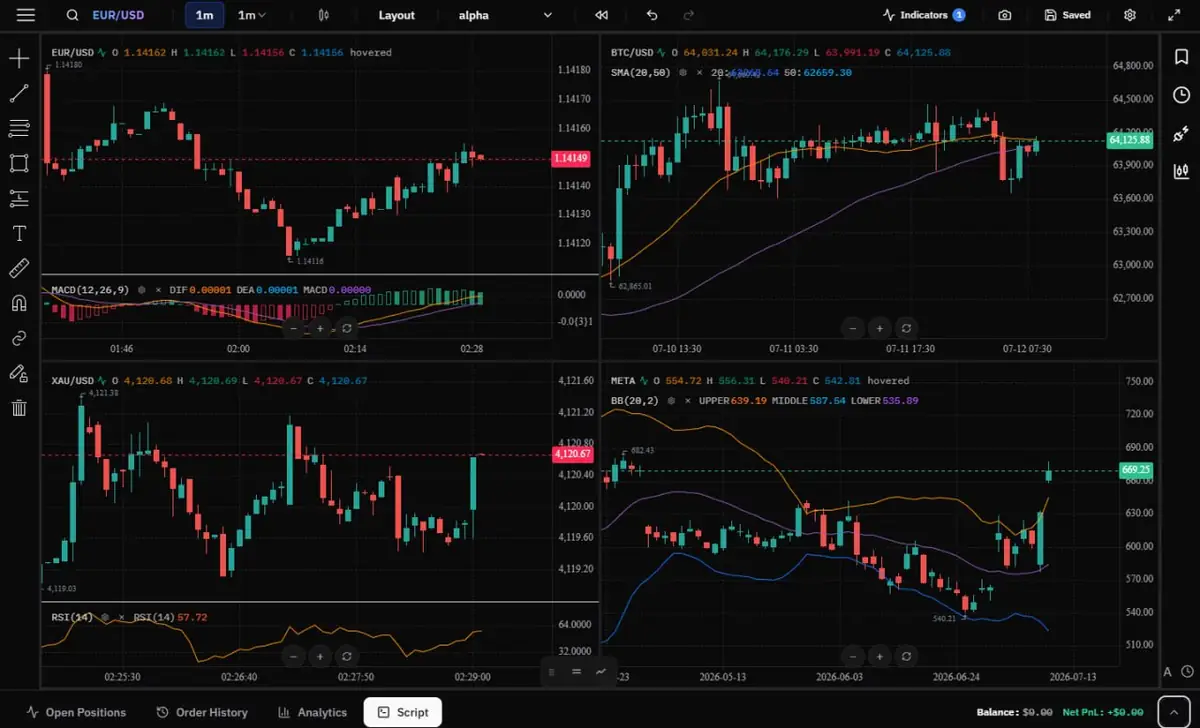 SuperCharts displays four markets together so a trader can compare symbols and timeframes without switching tabs.
That's also why this isn't built to hand you a bot either. Automating the entry and exit too early skips the exact rep you're here to build in the first place — the part where you sit through a losing streak, second-guess a setup, and still follow the rule anyway. That's not a feature we're missing. It's a step we don't think you should skip yet.
Different tools for different points in the same loop. Not two products competing for your attention — one system that assumes you'll actually use both.
What You're Actually Paying For, Feature by Feature
(Table below for the quick scan — the expanded explanation for each row follows underneath.)
| Feature | TJ Free | TJ Premium | FX Replay Intermediate | FX Replay Pro |
|---|---|---|---|---|
| Price | $0/₹0 | $12/mo or ₹499/mo ($119/yr) | $17.99/mo | $35/mo |
| Free trial | Not needed — free forever | 21 days, no card required | 5-day trial (card required, auto-charges after) | Same |
| Platform access | Web + mobile app | Web + mobile app | Browser only | Browser only |
| Backtesting sessions | 10/day | Unlimited | 10/month | Unlimited |
| Max session duration | 3 months | 3 months | 6 months | Unlimited |
| Trade history retention | Unlimited | Unlimited | 6 months | Unlimited |
| Trades per session | 200/session | Unlimited | 200/month | Unlimited |
| Multi-chart layouts | 2 charts (SuperCharts) | 4 charts (SuperCharts) | 2 charts | 8 charts |
| Indicators | 25 | 25 | 3 | Unlimited |
| Custom indicator building | Yes (JavaScript) | Yes (JavaScript) | Yes (FXR Script) | Yes (FXR Script) |
| Seconds-level data | Yes, in SuperCharts | Yes, in SuperCharts | No | Yes |
| Go-to feature (jump to a specific candle) | Yes | Yes | No | Yes |
| Same-window session stats | Yes | Yes | No | No |
| Prop-firm evaluation practice | No | No | Yes | Yes |
| Drawdown analytics | Advanced (50+ metrics) | Advanced (50+ metrics) | Basic | Basic |
| Scalper mode | Yes | Yes | Yes | Yes |
| Journal location | Inline (backtest notes) / log modal (live) | Same | Separate window | Separate window |
| Journal tagging | Unlimited categories | Unlimited categories | Single category | Single category |
| AI-assisted logging | Yes, natural-language | Yes, natural-language | AI tag optimization | AI tag optimization |
| CSV import | Yes | Yes | Yes | Yes |
| Live account syncing | 1 connection (Fyers, Zerodha, MetaTrader) | 25 connections (Fyers, Zerodha, MetaTrader) | 6 brokers (MT4, MT5, Tradovate, NinjaTrader, TradeLocker, cTrader) | Same |
| Advanced filters | Yes | Yes | Yes | Yes |
Backtesting Sessions
This is simply how many separate backtesting runs you're allowed before the plan cuts you off. Traders Journal's free plan gives you 10 a day. FX Replay's paid Intermediate plan gives you 10 a month — for money you're already spending. Both platforms go unlimited on their top tier.
Traders Journal: 10/day free, unlimited premium. FX Replay: 10/month Intermediate, unlimited Pro.
Trade History & Session Retention
How long a single session can run, and how long your trade history sticks around afterward before it disappears. Losing history means losing the exact data you'd need to go back and check a pattern later.
Traders Journal: unlimited history retention on both plans. FX Replay: 6-month cap on Intermediate, unlimited on Pro.
Trades Per Session
The ceiling on how many trades you can log inside one backtesting run before it stops counting. Hit the ceiling mid-session and you either stop testing or start a fresh session and lose continuity.
Traders Journal: 200/session free, unlimited premium. FX Replay: 200/month Intermediate, unlimited Pro.
Multi-Chart Layouts
Running more than one chart at a time — useful if you're testing across correlated pairs or comparing timeframes side by side, instead of switching tabs constantly.
Traders Journal: 2 charts free (in SuperCharts), 4 charts premium (SuperCharts). FX Replay: 2 charts Intermediate, 8 charts Pro.
Indicators & Custom Indicator Building
Built-in indicators are the ready-made ones. Custom indicator building is writing your own logic when the built-in list doesn't cover what your strategy needs.
Traders Journal: 25 built-in indicators, custom building on both plans. FX Replay: 3 indicators Intermediate, unlimited Pro; FXR Script custom building on both plans.
Go-to Feature
Jump straight to a specific candle instead of manually skipping forward one by one. Set the start of your session wherever you want and land on it in one click, instead of clicking "next" a hundred times to get there.
Traders Journal: free and premium. FX Replay: Pro plan only.
Seconds-Level Data & Market Depth
This is about how granular and how wide the actual historical data goes — seconds-level precision, futures/CME coverage, real stock data, and a toggle to strip out overnight price action and view only regular trading hours.
Traders Journal: seconds-level data in SuperCharts on both plans, covering most of what FX Replay offers across Dedicated Backtesting and SuperCharts. It also covers Indian markets (NSE, BSE, and MCX; broker connection required). FX Replay: none of this is available on Intermediate; seconds-level data, futures/CME data, 50+ stocks, and an RTH toggle are Pro-only.
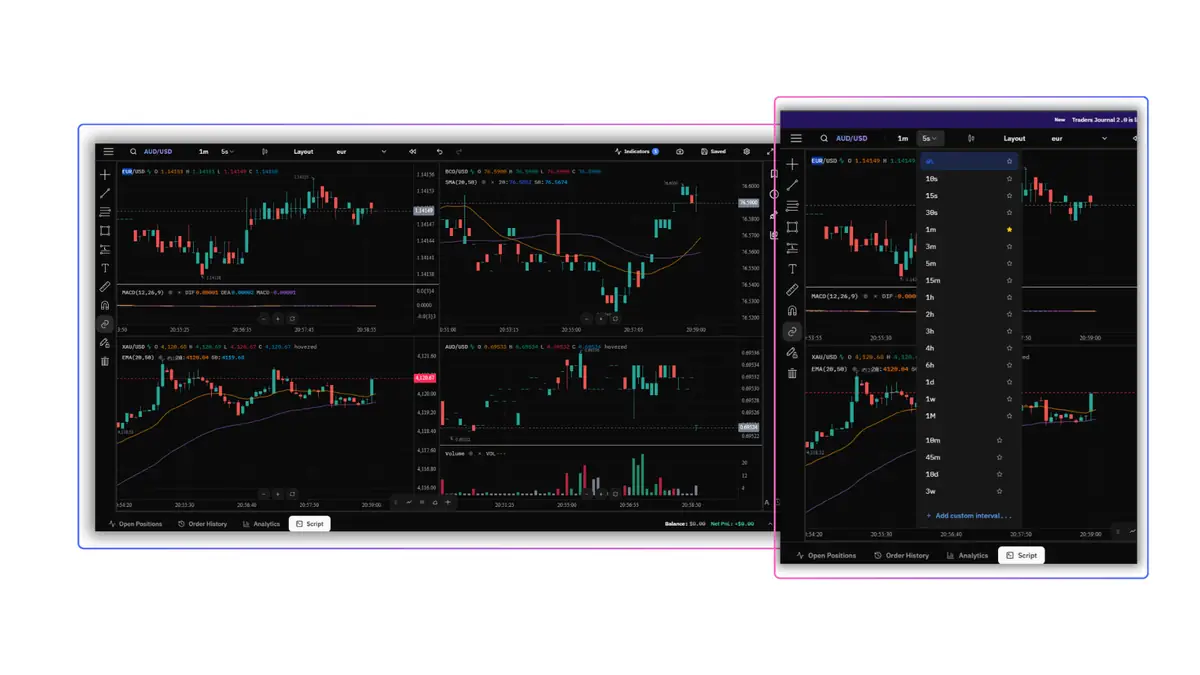 The timeframe menu shows seconds-level data while the four-chart layout keeps wider market context visible.
Prop-Firm Evaluation Practice
A simulated environment that mirrors prop-firm rules — drawdown limits, profit targets, daily loss caps — so you can practice under those exact constraints before paying for a real evaluation.
Traders Journal: not currently offered. FX Replay: included on both Intermediate and Pro.
If prop-firm evaluations are specifically your goal, this is a real, dedicated edge FX Replay has that's worth acknowledging plainly.
Drawdown Analytics
How deep the analysis goes after a session — not just win rate, but max drawdown, average drawdown, and recovery time, so you know exactly how rough the ride was, not just where it ended.
Traders Journal: advanced, 50+ metrics, both plans. FX Replay: basic on both plans.
Journal Location & Format
Where you actually write down what happened, and how much friction there is to do it. A separate window means stopping what you're doing and switching context. Same-workspace means the record and the trade live together.
Traders Journal: backtested trades get inline notes on the trade itself; live trades get a guided post-trade review with real questions, on both plans. FX Replay: opens in a separate window, per-trade only, on both plans.
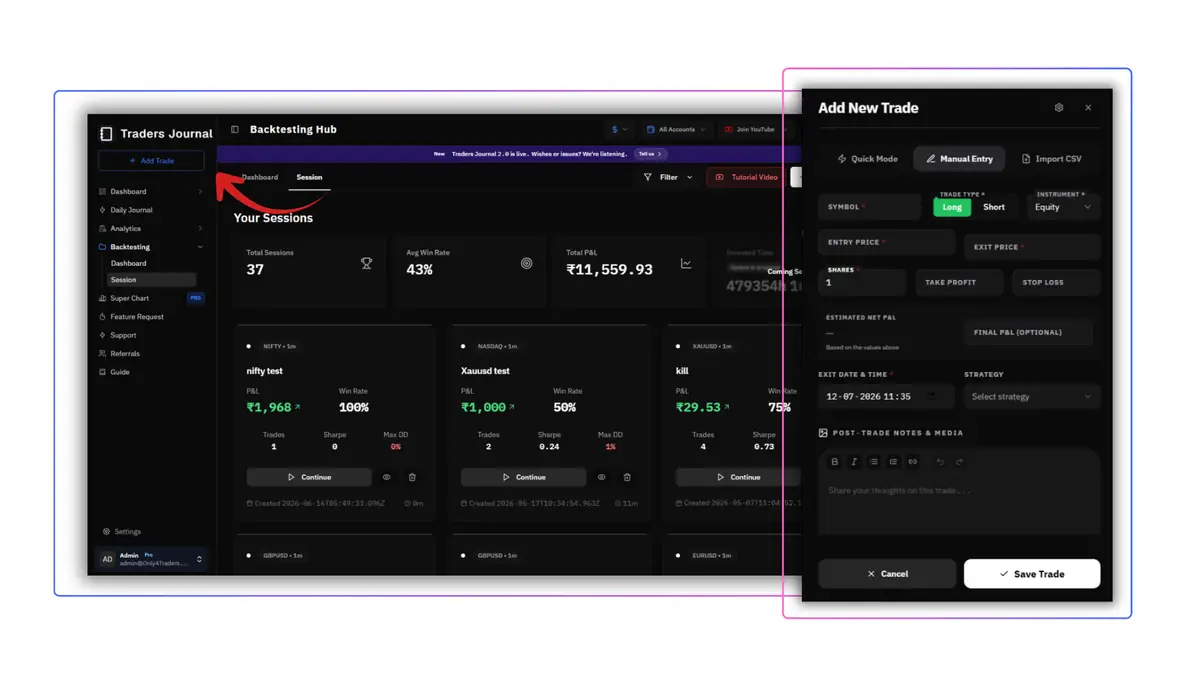 Traders Journal keeps backtesting sessions, performance statistics, trade entry, and post-trade notes in one workflow.
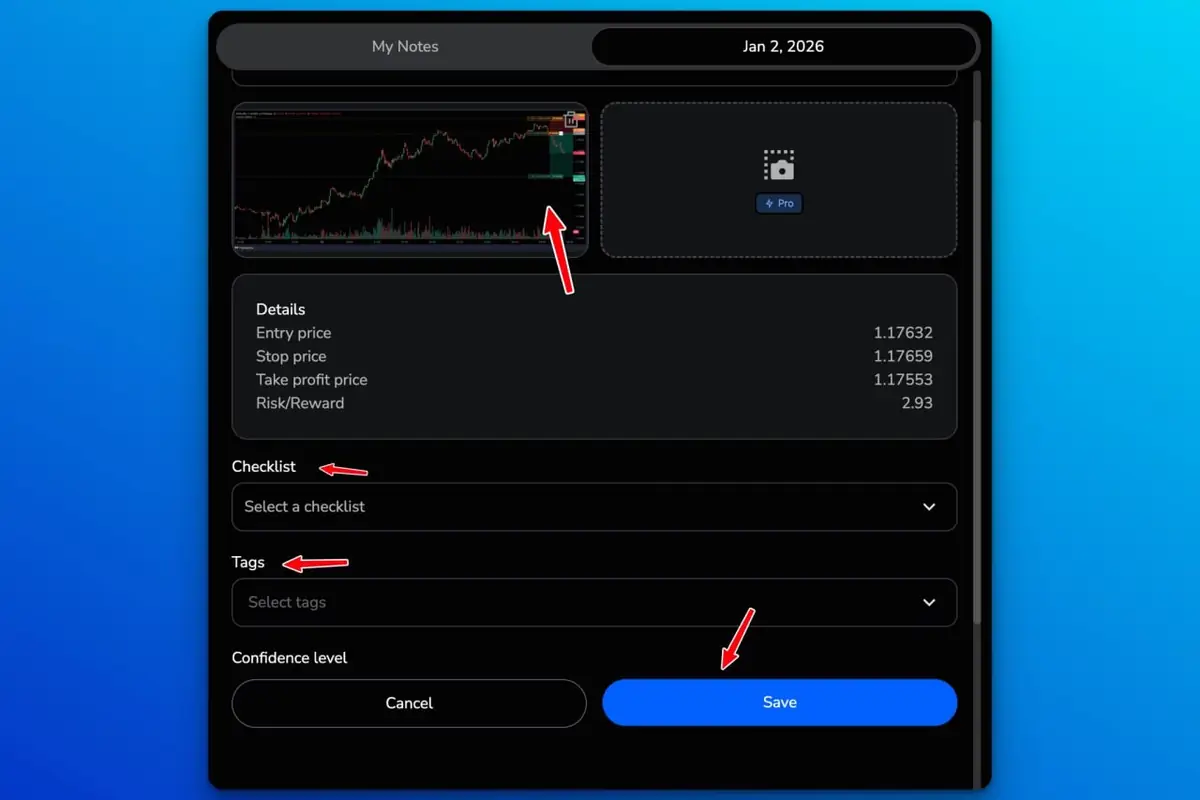 FX Replay records one trade with its chart, prices, checklist, tags, and confidence level inside the journal form.
Journal Tagging
How many categories you can label a trade with. A single trade is rarely just one thing — "breakout entry" and "moved my stop" can both be true of the same trade, and you'll want to search by either one later.
Traders Journal: unlimited categories, both plans. FX Replay: single category, both plans.
AI-Assisted Logging
How much of the actual writing the platform helps with. Natural-language logging means describing the trade in your own words and having it structured for you. Tag optimization means the AI flags which tags actually correlate with good or bad performance.
Traders Journal: natural-language logging, both plans. FX Replay: AI tag optimization, both plans.
Live Account Syncing
Whether your live trades pull in automatically from your broker, or you're uploading a CSV by hand every time.
Traders Journal: 1 automated connection on free, 25 on premium, covering 756+ brokers through direct sync and MT4/MT5 terminals. FX Replay: unlimited connection across 6 brokers (MT4, MT5, Tradovate, NinjaTrader, TradeLocker, cTrader), on both plans.
This used to be a real gap on our side and no longer is. FX Replay still wins on native niche-platform coverage — Tradovate, NinjaTrader, TradeLocker and cTrader connect directly there and don't here. If you trade on one of those specifically, that's a genuine reason FX Replay might fit better today. Anything running MetaTrader, or any broker with a clean statement export, syncs fine on our side.
Price
Traders Journal: $0/₹0 free, $12/month or ₹499/month premium ($119 billed annually) — full breakdown on our pricing page. FX Replay: $17.99/month Intermediate, $35/month Pro.
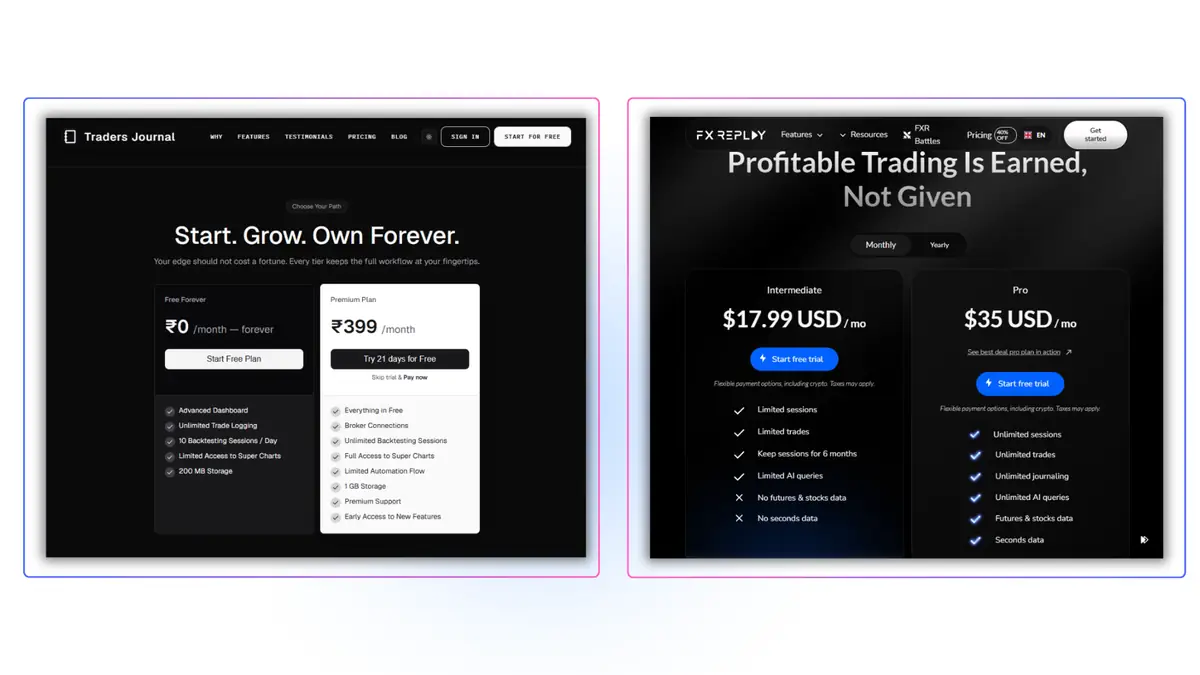 The pricing pages show the practical difference between Traders Journal's free and premium plans and FX Replay's Intermediate and Pro plans.
The free-tier comparison earlier in this piece already makes the honest point here — Traders Journal's free plan out-limits FX Replay's paid Intermediate tier on almost every backtesting metric, before any money changes hands.
Extras
The features that don't fit neatly into backtesting or journaling, but are still worth knowing before you pick a side.
Traders Journal, both plans:
- Live Data with SuperCharts: View live markets alongside historical replay.
- Advanced Analytics Tracking: Review performance, edge, progress, and behaviour separately instead of relying on one blended score.
- On-Demand Feature Requests: Request a missing feature based on how you trade.
- Natural Language-Based Indicator Builder (Beta): Describe an indicator in plain language and build the logic through chat.
FX Replay, both plans: Mentor AI (beta) for behavioral coaching on your sessions, FXR Battles for head-to-head replay against other traders, and a strategy library of pre-built strategies to test against.
Neither side's extras are filler — SuperCharts live data and the behaviour-specific analytics are genuinely useful for a trader trying to isolate what they're actually doing wrong, and FXR Battles and Mentor AI genuinely make FX Replay's practice loop feel less like homework. It is worth knowing both exist, whichever platform you choose.
Other FXReplay Alternatives Worth Knowing
FX Replay and Traders Journal aren't the only two names in this conversation, so here's the honest shortlist of what else shows up when traders go looking for an alternative.
Forex Tester Online is the closest thing to a third rival here — tick-level data, up to 10 synced charts, and a prop-firm challenge simulator, on a subscription that lands close to Traders Journal Premium. If forex is your whole focus and reps are your bottleneck, it's worth a look; we broke it down in full here.
TradingView is the default reach for pure charting and bar-replay — not a backtesting or journaling tool on its own, but genuinely the best free way to sanity-check price action before committing to any platform's paid tier.
TradeZella leans the other direction: it's journal-first, built around importing your live trades and analyzing them after the fact, with backtesting as a lighter add-on rather than the core product.
None of these change the actual choice in this article — FX Replay for polishing a proven edge, Traders Journal for building the habit — but if your situation doesn't fit either one cleanly, one of these three probably will.
So, Is Traders Journal the Right FX Replay Alternative?
Remember the axe and the knife. Neither one is the better tool. They're just built for different jobs, and the honest question was never "which is better" — it's "which job is actually yours."
If you already know your bottleneck is reps — you've got a strategy, you trust it, and you specifically need deep replay, prop-firm practice, and futures-grade data to sharpen an edge you've already found — FX Replay Pro earns its $35 a month. That's not a consolation prize. It's a genuinely strong, focused tool for a trader who's past the stage this whole article is written for.
For most traders reading this, though — still building the habit, still below breakeven or just past it, still working out where the leak actually is — the numbers do the talking better than we can. Traders Journal's free plan already out-limits FX Replay's paid Intermediate tier on backtesting sessions, trade history, and trades per session, before you've spent a rupee. Premium adds the rest — unlimited everything, SuperCharts, and behaviour analytics — for $12 a month, roughly a third of FX Replay Pro's price and still under their entry tier. If the job in front of you is building the whole loop — chart it, test it, journal it, review it, repeat — that's the tool built specifically for that job, not a cheaper version of someone else's.
Pick the one built for your job. Not the one your Discord server mentions more.