
On this page
- The Itch
- What You Actually Need From a TradingView Bar Replay Alternative
- How to Replay Trades on TradingView (and Where It Stops)
- How We Compared: TradingView vs Traders Journal
- Who TradingView Is Actually Built For
- Traders Journal: The Whole Loop, Not One Piece of It
- What You're Actually Paying For, Feature by Feature
- So, Is Traders Journal the Right TradingView Alternative?
Key takeaways
- Bar replay gives you reps. A journal turns reps into lessons. You need both halves, and TradingView only ships the first.
- TradingView's free Basic plan replays daily candles and up. Minute-chart replay starts at Essential (180 days of history), with deeper history on Plus, Premium, and Ultimate.
- Traders Journal replays minute charts on its free plan, with years of history, and logs every replay trade with notes, tags, and 50+ session metrics.
- TradingView wins on charting, market coverage, and its Pine Script Strategy Tester report. Traders Journal runs Pine scripts but has no full strategy-tester report.
- Most traders don't need to choose: chart on TradingView, replay and journal in Traders Journal.
Quick answer: if you live on TradingView for charts, Pine Script, and its community, keep it. It's the charting tool most traders already know, and for good reason. But if you came here because Bar Replay stopped at daily candles on the free plan, or because your replay trades vanish the moment the session ends, Traders Journal replays minute charts for free and writes every replay trade into a journal with stats.
Searching for a TradingView bar replay alternative usually means one of two things happened. You pressed Replay on a 5-minute chart and TradingView asked you to upgrade. Or you replayed a whole week of trades, felt productive, closed the tab, and realised you had nothing to show for it the next morning.
Both are fair reasons to look around. Neither means TradingView is a bad tool.
TradingView, quick take
- Good for: charting, a huge indicator and script library, Pine Script strategy testing, and a big community.
- Watch out for: minute-chart replay needs a paid plan, history depth depends on the plan, and replay trades don't go into any journal.
Traders Journal, quick take
- Good for: free minute-chart replay, with every replay trade logged, tagged, and turned into session stats.
- Watch out for: no full strategy-tester report like TradingView's, and a smaller market list.
TradingView vs Traders Journal at a glance
| Feature | TradingView | Traders Journal |
|---|---|---|
| Price | Free Basic plan, paid plans from $14.95/mo (Essential) | $0 Free Forever, Premium $12/mo or $119/yr (₹499/mo) |
| Replay on minute charts, free plan | No, daily candles and up only | Yes |
| What replay is for | Watching price, quick sanity checks | Building a case for one setup, trade by trade |
| Where replay trades end up | A trade list inside the session | Journal with notes, tags, and 50+ metrics |
| Best for | Charting and coded strategies | Manual traders building a testing and journaling habit |
Checked against TradingView's pricing page and help center on November 13, 2026. Plans change, so trust their site over ours.
What You Actually Need From a TradingView Bar Replay Alternative
A Traders Journal replay session: historical candles, a simulated trade, and the result, before any real money is at risk.
Think about cricket nets. A batter can face a bowling machine for two hours and walk out feeling sharp. Ball after ball, the same length, the same pace. It feels like practice. But ask them which deliveries they edged, and they won't know. Nobody was counting.
Now put a coach behind the nets with a notebook. Same two hours. Except now every edge, every late shot, every ball left alone that should have been played gets written down. Next session, you don't practise everything. You practise the one shot that keeps getting you out.
Bar replay is the bowling machine. It's a good machine. It throws real market candles at you, one at a time, with the future hidden. What it doesn't do on its own is keep the notebook. A replay tool that never asks you why you took a trade gives you reps without memory. You'll feel busy. You won't actually get better.
Here's the honest checklist before you switch anything:
- Can you replay the timeframe you actually trade? If you trade the 5-minute chart, replaying daily candles is practice for a different sport.
- Can you go back far enough? One good week proves nothing. You want trending months, dead months, and news days, ideally a few years of them.
- Can you take the trade inside the replay? Watching a setup form is not the same as clicking buy with a stop and a target, then sitting through it.
- Does the trade survive the session? If the lesson disappears when you close the tab, next month will repeat this month's mistake with a different excuse.
If a tool ticks the first three and fails the fourth, it's a bowling machine with no coach. Plenty of reps. No memory.
How to Replay Trades on TradingView (and Where It Stops)
Before comparing anything, here's how replay works on TradingView, because most people looking for an alternative still use it. Our full walkthrough is in how to backtest on TradingView. The short version:
- Open a chart and press Replay in the top toolbar. A blue vertical line with a pair of scissors follows your cursor.
- Pick your start point. Click a candle, or use "Select date" to jump to a specific day. Everything after that point is hidden.
- Step forward or play. Shift + Right arrow steps one candle. Shift + Down arrow plays and pauses. You can change playback speed.
- Trade it. Open the Trading Panel, connect Paper Trading, and place buy or sell orders while the replay runs.
That part works well. The limits show up in three places:
- The timeframe wall. On the free Basic plan, replay works on daily candles and above. Minute-chart history starts at Essential (180 days), goes to 365 days on Plus, and covers all available minute data on Premium and Ultimate. Seconds data is Premium and up. Tick data is Ultimate only, 7 days of it.
- Chart types and alerts. Renko, Kagi, Point and Figure, Range, Line Break, footprint, and TPO charts don't replay. You also can't create server-side alerts during a replay.
- The memory wall. Your replay trades sit in that session's trade list. There's no journal field for why you entered, no tags, and no way to see across sessions whether your "breakout" trades actually make money.
A quick workaround if you hit "Data point unavailable" on a lower timeframe: pick the start point on a higher timeframe first, then switch down. It only helps if your plan has that intraday history at all.
How We Compared: TradingView vs Traders Journal
Plenty of traders keep TradingView open all day, and they should. So this isn't a "switch everything" pitch. We opened both, ran replay sessions on both, and checked every TradingView claim against its own pricing page and its Bar Replay help article on November 13, 2026. Traders Journal numbers come straight from our own plan limits.
Here's the thing worth saying before any feature table. Comparing TradingView and Traders Journal on replay alone is a bit like comparing a Swiss Army knife and a chef's knife on how well they slice onions. The chef's knife wins that one test. That doesn't make the Swiss Army knife a worse tool. It carries twenty blades, and slicing onions is just one of them.
TradingView is the Swiss Army knife. Replay is one blade among charting, screeners, alerts, scripts, news, and a social network. Traders Journal is closer to the chef's knife. Replay, journaling, and review are the main job, not a side feature.
So the question running under every section isn't "which tool wins." It's "which job are you hiring a tool for right now."
Who TradingView Is Actually Built For
TradingView is built for almost anyone who looks at a chart. That's its strength.
If you write or tweak Pine Script, TradingView is the obvious home. Its Strategy Tester runs a coded strategy across years of history in seconds and hands you a full report. Traders Journal runs Pine scripts too, and a Pine strategy's entries and exits show on the chart, but there's no full Strategy Tester report. We're not going to pretend otherwise. If your edge is a rule a computer can follow without you, TradingView's Strategy Tester is the right tool.
It's also the place for breadth. A huge market list, thousands of community indicators, plus ideas, screeners, and alerts that keep running while you sleep. If you need one tab for "everything about the market," it's hard to beat.
Where it stops is the manual trader's practice loop. Replay is there, and it's good. But the minute charts most intraday traders replay are behind a paywall, and the trades you take in replay don't connect to anything. TradingView was never built to be your trading journal. That isn't a flaw. A Swiss Army knife isn't a bad tool because it doesn't come with a cutting board.
So if you're a coder, a chart reader, or someone who just wants the best charts on the internet, TradingView is doing exactly its job. Keep it.
Traders Journal: The Whole Loop, Not One Piece of It
Back to the nets. The coach with the notebook isn't there to replace the bowling machine. The coach is there to make sure the reps turn into something. Same balls. Different outcome.
That's the job Traders Journal was built for. You practise on real historical candles, take the trade, write down why, and see across sessions what's actually working. It's for traders still building that habit, traders who keep losing and can't say why, and traders who are making money but aren't sure it'll last. Different stages. Same need: test the idea, then learn from your own mistakes instead of moving on to the next trade and hoping.
Two features keep that loop closed.
Dedicated bar replay backtesting is for when you've narrowed down to one setup and want to build the case for it. You replay, take the trade, and add your reasoning in the same place. No second window. Session stats show your win rate, drawdown, and profit factor from what you actually logged, so you fix one specific thing at a time.
SuperCharts is for the stage before that. It's a TradingView-style bar replay across forex, gold, oil, crypto, US index futures, and Indian indices, built for scanning wide. Does this hunch hold on gold, on NIFTY, on three different pairs? Check that before you commit real testing time.
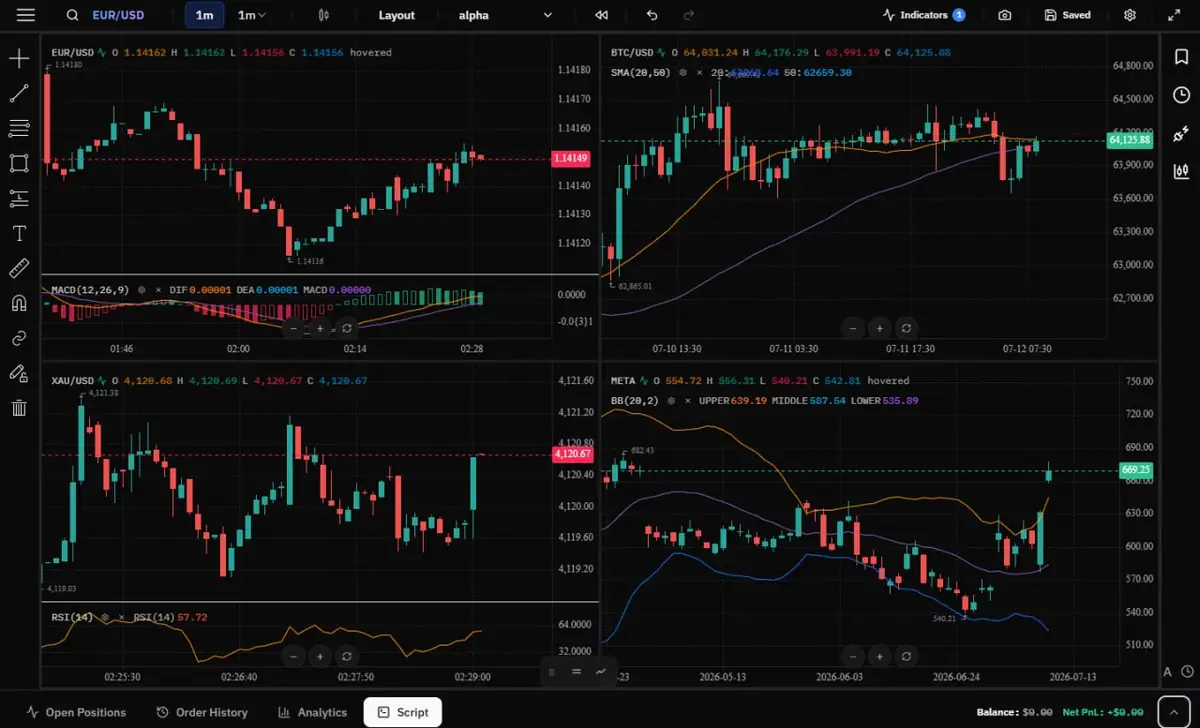 SuperCharts replays four markets together, so a hunch can be checked across symbols before deeper testing.
And when the replay results look good, the next step is the live clock. Our paper trading simulator runs replay and live paper trading in the same account, so the rule you proved on old candles meets today's market without a new tool.
What You're Actually Paying For, Feature by Feature
(Table first for the quick scan. Each row is explained underneath.)
| Feature | TradingView Basic (free) | TradingView paid | TJ Free | TJ Premium |
|---|---|---|---|---|
| Price | $0 | From $14.95/mo (Essential) | $0/₹0 | $12/mo or ₹499/mo ($119/yr) |
| Bar replay on the free plan | Daily candles and up | Yes | Yes, minute charts included | Yes |
| 1-minute replay history | None | 180 days (Essential), 365 days (Plus), all (Premium, Ultimate) | Years: EUR/USD from 2020, gold and NIFTY from 2015 (sessions up to 90 days each) | Same, no session length cap |
| Seconds data | No | Premium and Ultimate | Yes, in SuperCharts | Yes, in SuperCharts |
| Trading inside replay | Yes | Yes | Yes | Yes |
| Multi-chart replay | Plan-limited layouts | Yes | 2 charts | Up to 8 charts, 3 symbols together |
| Indicators per chart | Plan-limited | More on higher plans | 5 | 25 |
| Custom indicators | Pine Script | Pine Script | Pine Script and JavaScript, plus an AI indicator builder | Same |
| Automated strategy backtesting | Pine Script Strategy Tester | Same, plus Deep Backtesting on higher plans | Pine strategy trades shown on the chart, no tester report | Same |
| Jump to a date | Yes | Yes | Yes | Yes |
| Replay session stats | Trade list | Trade list | 50+ metrics per session | Same |
| Journal | None built in | None built in | Inline notes on every replay trade | Same |
| Journal tagging | None | None | Unlimited categories | Unlimited categories |
| Live paper trading | Yes | Yes | Yes, SuperCharts | Yes, SuperCharts |
| Alerts during replay | No server-side alerts | No server-side alerts | Alerts run on live charts (10) | Alerts run on live charts (50) |
| Mobile app | Yes | Yes | Yes | Yes |
Bar Replay on the Free Plan
This is the first wall most people hit. TradingView's free Basic plan lets you replay daily, weekly, and monthly candles. The moment you switch to a 15-minute chart, replay needs a paid plan. Traders Journal's free plan replays minute charts from day one.
TradingView: daily and up on Basic, intraday on paid plans. Traders Journal: minute charts on Free and Premium.
Minute & Second-Level History
How far back you can replay on the timeframe you actually trade. A strategy that only saw last quarter hasn't met a bad year yet.
TradingView: 180 days of minute data on Essential, 365 on Plus, everything available on Premium and Ultimate; seconds on Premium and up. Traders Journal: 1-minute history going back years, for example EUR/USD from 2020, gold and NIFTY from 2015, Bitcoin and US index futures from 2021; seconds-level data in SuperCharts on both plans.
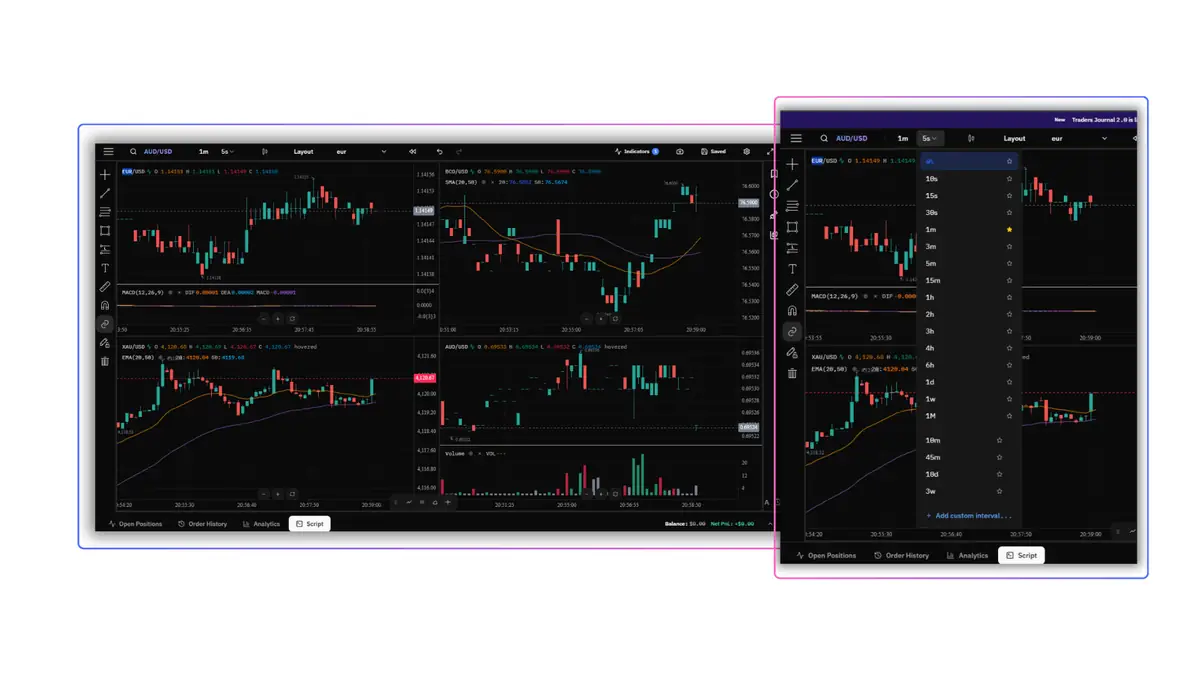 Seconds-level timeframes in SuperCharts, with a four-chart layout for wider market context.
Trading Inside Replay
Whether you can actually place a trade with a stop and target while candles print, instead of just watching.
TradingView: yes, through Paper Trading in the Trading Panel. Traders Journal: yes, with a buy and sell panel inside the session.
Multi-Chart Replay
Replaying more than one chart on the same clock, useful for correlated pairs or a higher timeframe next to your entry chart.
TradingView: supported, layout count depends on plan. Traders Journal: 2 charts free, up to 8 charts and 3 symbols replayed together on Premium.
Indicators & Custom Indicator Building
Built-in indicators are the ready-made ones. Custom building is writing your own logic when the list doesn't cover your setup.
TradingView: one of the largest indicator libraries around, and Pine Script for custom work; per-chart limits rise with the plan. Traders Journal: 5 indicators per chart free, 25 on Premium; run Pine scripts, write custom indicators in JavaScript, or describe one in plain English and let the AI builder write it.
Automated Backtesting (Pine Script Strategy Tester)
Running a coded rule across years of data automatically, with no clicking.
TradingView: yes, the Strategy Tester, on every plan. Traders Journal: Pine strategies plot their entries and exits on the chart, but there's no Strategy Tester report.
This is a real TradingView advantage, and we're fine with that gap. Automating entries too early skips the rep a manual trader is here to build: sitting through a losing streak and following the rule anyway. If your rule is code, use TradingView for this part.
Go-to Date / Jump to Session
Landing on a specific day instead of clicking "next" a few hundred times.
TradingView: yes, "Select date." Traders Journal: yes, on both plans.
Replay Results & Performance Stats
What you get when the replay ends. A list of trades tells you what happened. Stats across sessions tell you why.
TradingView: a trade list for the session. Traders Journal: win rate, drawdown, profit factor, and 50+ metrics per session, on both plans.
Journal Location & Format
Where you write down why you took the trade, and how much friction that adds.
TradingView: no built-in journal; notes go in a separate app or a spreadsheet. Traders Journal: inline notes on each replay trade, in the same window, on both plans.
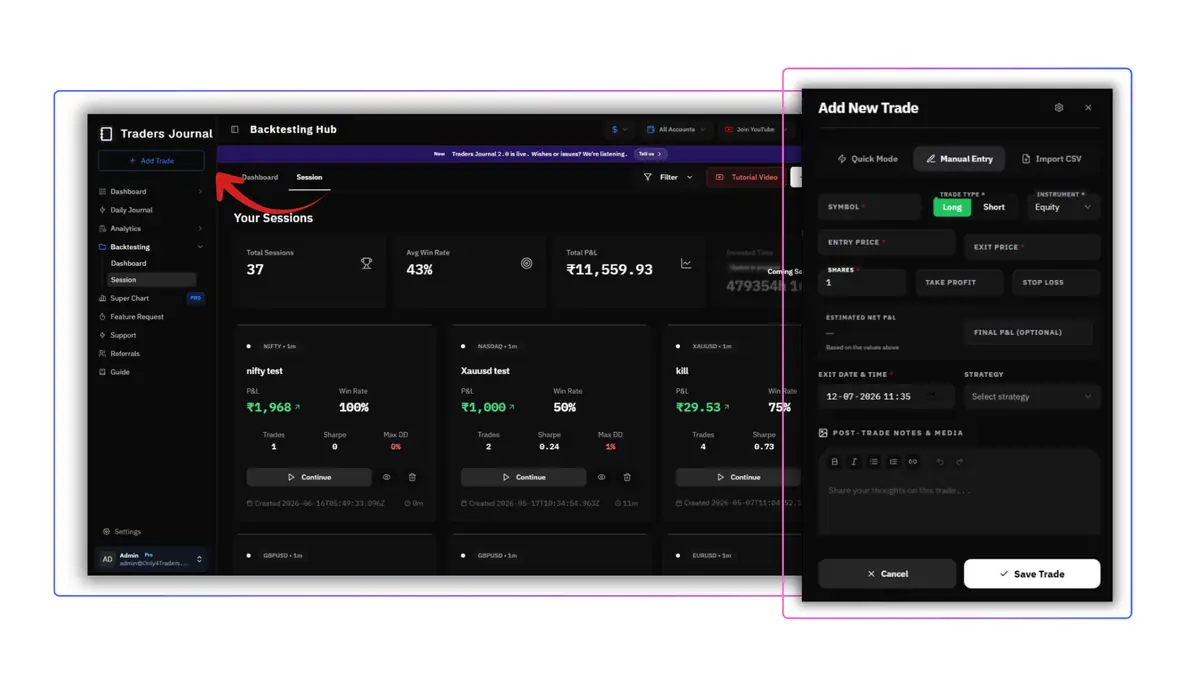 Replay sessions, session stats, trade entry, and post-trade notes in one window.
Journal Tagging
Labelling a trade so you can find it later. One trade can be both "breakout entry" and "moved my stop," and you'll want to filter by either.
TradingView: not available. Traders Journal: unlimited tag categories, both plans.
Live Paper Trading
Practising on today's market after replay, with fake money and the real clock.
TradingView: yes, Paper Trading, free for everyone. Traders Journal: yes, live paper trades on SuperCharts in the same account as your replay.
Alerts During Replay
Whether the platform pings you while you replay.
TradingView: server-side alerts can't be created during replay. Traders Journal: alerts are for live SuperCharts (10 on Free, 50 on Premium); replay is for practising the decision, not waiting for a ping.
Price
TradingView: free Basic, paid plans from $14.95/month (Essential), more for Plus, Premium, and Ultimate; see their pricing page. Traders Journal: $0/₹0 Free Forever, Premium $12/month or ₹499/month ($119 billed yearly), with a 21-day trial; full breakdown on our pricing page.
The honest version: if minute-chart replay is the only reason you'd upgrade TradingView, Traders Journal's free plan already covers it.
Extras
The things that don't fit neatly into one row.
TradingView: screeners, a huge public script library, community ideas, news, and alerts across many markets.
Traders Journal, both plans:
- Live data with SuperCharts: live markets next to historical replay.
- Behaviour analytics: performance, edge, progress, and behaviour reviewed separately, not one blended score.
- Broker sync for live trades: 1 automated connection free, 25 on Premium.
- Feature requests: ask for what's missing based on how you trade.
So, Is Traders Journal the Right TradingView Alternative?
Remember the Swiss Army knife and the chef's knife. Nobody throws out the Swiss Army knife because a chef's knife slices onions better. You keep both, and you reach for the one built for the job in front of you.
Pick TradingView if your strategy is code, if you need a very wide market list, or if you're happy paying for a plan that unlocks the intraday history you replay. As a charting platform, it's hard to beat.
Pick Traders Journal if you trade manually, you want to replay minute charts without paying for it, and you want every replay trade to land in a journal that tells you what's working. The free plan covers that. Premium adds unlimited sessions, 8-chart layouts, and longer sessions for $12 a month, less than TradingView's cheapest paid plan.
Or use both. Plenty of traders do. Chart and scan on TradingView. Replay, journal, and review in Traders Journal.
Pick the tool built for your job. Not the one your Discord server mentions more.
Frequently asked questions
01Is TradingView bar replay free?
Partly. The free Basic plan replays daily, weekly, and monthly candles. Replay on intraday charts like the 1-minute or 5-minute needs a paid plan: Essential gives 180 days of minute history, Plus 365 days, and Premium and Ultimate everything available.
02How do you replay trades on TradingView?
Press Replay in the top toolbar, click a candle or use Select date to set the start, then step forward with Shift + Right arrow or play with Shift + Down arrow. To trade during the replay, open the Trading Panel, connect Paper Trading, and place orders as the candles print.
03Can you place trades in TradingView bar replay?
Yes. Connect Paper Trading in the Trading Panel and you can place market, limit, and stop orders while the replay runs. The trades stay in that session's list; TradingView doesn't journal them or track stats across sessions.
04Why can't I replay 1-minute charts on TradingView's free plan?
Intraday replay history is tied to paid plans. On Basic, replay only covers daily candles and above. If you see Data point unavailable on a lower timeframe, your plan doesn't include minute history for that date.
05What is the best free TradingView bar replay alternative?
For manual traders, Traders Journal is a strong free option: it replays minute charts on the free plan with years of history, lets you trade inside the replay, and logs every trade into a journal with session stats. If you need coded strategy testing, stay with TradingView's Strategy Tester.
06Does TradingView have a trading journal?
No. TradingView has charts, Paper Trading, and a Strategy Tester, but no built-in journal for notes, tags, or performance review across sessions. Traders usually pair it with a spreadsheet or a separate journal app.
07Can I use TradingView and Traders Journal together?
Yes, and it's a common setup. Chart, scan, and build ideas on TradingView, then replay the setup and journal every trade in Traders Journal, where the stats tell you whether the idea actually holds.
08Is Traders Journal free forever?
Yes. New users get 21 days of Premium for a small refundable charge, then move to Free Forever automatically if they don't upgrade. The free plan keeps minute-chart replay, 10 backtesting sessions a day, and the journal. Premium is $12 a month or $119 a year.
Test it with zero money on the line
Free candle replay, trade journaling and session stats in one workspace.
Small refundable charge. Cancel anytime — your trades stay yours.
More comparisons
- TradeZella vs Traders JournalJournal with broker sync, reports and trade replay.
- FX Replay vs Traders JournalBrowser market replay for manual backtesting.
- Forex Tester vs Traders JournalBacktesting software with historical tick data.
- TradingSim vs Traders JournalBrowser market replay for US stocks, futures and crypto.