Most futures traders never shop for the best backtesting software for futures. They use whatever their broker handed them, run five trades on it, and call that research. Then the real account finds out the five trades were a mood, not a method.
Quick answer: if you code your rules, NinjaTrader (free to backtest) or QuantConnect (cloud, Python or C#) are the deep options. If you want to see the chart first, TradingView replay is the easiest start. Sierra Chart is the tick-level tinkerer's tool. And if you'd rather replay past sessions by hand, no code, with every trade logged, that is what Traders Journal backtesting does, free for one symbol at a time. Pick the tool that matches how you actually test, not the one with the longest feature list.
Start free, no card
Practice on real price history and live charts with fake money, and find out what works before it costs you a rupee or a dollar.
What Futures Backtesting Needs That Stock Tools Skip
Futures are not shares with an expiry date bolted on. A few things change how you test, and a tool that ignores them will flatter you.
- Contracts expire. A five-year test stitches several contracts into one continuous series. Back-adjusted series keep point differences but shift old prices, so a rule keyed to a round number like 20,000 can fire at the wrong level. Whichever tool you use, find out how it builds the series.
- Every point has a dollar value. NQ is $20 a point, MNQ is $2, per CME's contract specs. A backtest in points hides what a stop costs your account. More on that below.
- Costs are not optional. Commissions, exchange fees and slippage eat marginal edges. Say $4 round-turn on one NQ contract: over 200 trades that's $800 before slippage. A test with costs switched off is a test of a different account.
- Sessions matter. The New York open and the overnight session behave like two different markets. Your test should know which one you trade.
- Bar or tick data. Bar data is fine for rules that fire on a candle close. If you scalp inside the bar, you need tick data, and the tool has to have it.
Manual Replay or Automated Backtest?
Every backtest checks a fixed rule against past data. The split is who executes the rule.
Manual replay means you step through history candle by candle and place the trades yourself, under rules you wrote first. It's slower. It also shows you the boring stretches, the false starts and the stops that were too tight, which a summary number hides. TradingView replay and Traders Journal work this way.
Automated backtesting means the software runs the rule across years of data in seconds. NinjaTrader's Strategy Analyzer, TradeStation's Strategy Tester and QuantConnect do this, and it removes hindsight bias completely. The price is precision: the rule has to be exact enough to code. "Buy a strong pullback" isn't. "Buy the first close back above the 20-period average after a 10-tick pullback" is.
Plenty of traders do both. Replay by hand until the rule is clear, then code it and run it across more data. A rule you can't explain in one sentence isn't ready for either.
Bar Data or Tick Data?
Bar data records open, high, low and close for each candle. Tick data records every trade. The honest question is where your rule fires.
If your entry waits for a candle to close, say a 5-minute close above the opening range, 1-minute bars are enough. The test knows what happened at the close and nothing it shouldn't. If your rule fires inside the candle, like a limit order that gets hit mid-bar, a bar can't tell you whether your stop or your target traded first. That's where tick data earns its price.
Most retail rules are the first kind. So don't pay for tick data because it sounds more serious. Pay for it when your rule needs it. Tick-level tools on this list: NinjaTrader's Market Replay, Sierra Chart's historical data service, and QuantConnect's paid plans.
Contract Rollover: How to Handle It in a Backtest
A futures contract expires, so a multi-year chart is several contracts glued together. How the glue works changes your results. Three steps keep it honest:
- Know the method. Back-adjusted series shift old prices so there's no gap at each roll. Unadjusted series keep real prices but show a jump on the roll date that your rule might trade as a signal.
- Match your live setup. Test on the same kind of series you'll trade. A rule built on a back-adjusted chart can misread a round number when you trade the real contract.
- Charge for the roll. Rolling closes one contract and opens another, so it costs two commissions and a little slippage. Put it in the test.
Not every tool tells you how it builds its series. If a vendor page doesn't say, test one known roll date yourself and look at what the chart does.
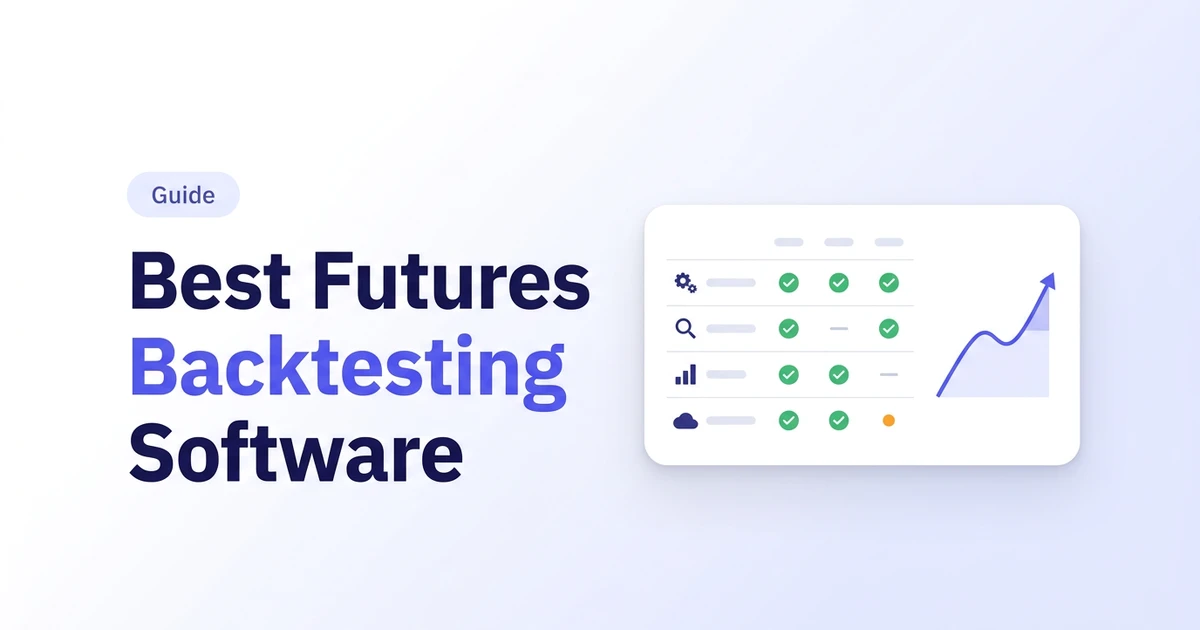
Futures Backtesting Software Compared
| Tool | How you test | Code needed? | Futures data | What it costs to test |
|---|---|---|---|---|
| NinjaTrader | Strategy Analyzer on coded strategies. Market Replay plays history tick by tick | Yes for automated tests (NinjaScript). No for manual simulated trading | CME futures | Charts and simulated trading free. Market Replay needs a funded account |
| TradingView | Bar replay by hand. Pine Script strategies in the Strategy Tester | Not for replay. Yes (Pine) for automated tests | Futures charts | Free plan. Intraday bar replay is on paid plans |
| Sierra Chart | Replay and custom studies | C++ (ACSIL) for custom automation | Sierra Chart's own historical data service is included | $26 to $56 a month, by package |
| TradeStation | Strategy Tester on EasyLanguage strategies | Yes (EasyLanguage) | TradeStation's own feed | Tied to a TradeStation brokerage account |
| QuantConnect | Cloud backtests | Yes (Python or C#) | Futures at minute, hour and daily on the free plan. Tick and second data is not on free | Free plan. Paid plans start around $84 a month (Researcher, recommended setup) |
| Traders Journal | Manual bar replay, every trade journaled | No | NQ, ES, YM, NIFTY and BANKNIFTY, 1-minute history | Free plan: one symbol per session, 90-day range, 10 sessions a day. Premium $12 a month |
Checked against each vendor's own pricing or docs page on 20 November 2026. Prices and plans move, so trust their site over ours. TradeStation's page doesn't price its backtesting separately, so there is no number in that row.
Quick picks
- I code, and I want depth: NinjaTrader or QuantConnect.
- I want to see the chart and click through history: TradingView replay, or Traders Journal if you want the trades logged.
- I want tick-level control and don't mind setup: Sierra Chart.
- I already have a TradeStation account: use its Strategy Tester before buying anything else.
- I want to start free and fast: Traders Journal, then read how to backtest a trading strategy properly.
How We Compared
We build Traders Journal, so treat our row with healthy suspicion. To keep this fair I didn't score anything on vibes. I opened each vendor's own pricing or docs page on the same day and noted five things: how you test, whether you must code, what futures data you get, what it costs to start, and what it asks of you first (a funded account, a brokerage login, a card). No affiliate links. Nobody paid to be on this list.
We haven't run a month-long trial of every tool, so this is a spec-and-workflow comparison, not a lab result. Where a vendor page didn't say, the table says so.
The 6 Best Backtesting Software Options for Futures
1. NinjaTrader
 Photo by AlphaTradeZone on Pexels
Think of NinjaTrader as a workshop built for futures. The tools are heavy and sharp, and they assume you know what you're making. NinjaTrader's pricing page lists charting and simulated trading as free, no funding needed. Strategy Analyzer is the window where coded strategies get backtested and optimized, and Market Replay plays historical data back tick by tick, but replay unlocks only once your live account is funded.
The three plans on the page (Free, $99 a month, $1,499 lifetime) set commission rates when you trade live through NinjaTrader. They don't gate the backtest. Pick NinjaTrader if you write or buy strategies and want to optimize them on futures data.
- Good: free charts and simulated trading with no time limit, a Strategy Analyzer for coded strategies, and tick-by-tick Market Replay once funded.
- Watch: Market Replay needs a funded account, and automated tests mean writing NinjaScript.
2. TradingView
TradingView is the sketchbook: quick to open, nice to look at, and where most traders already do their charting. Bar replay lets you step through past candles by hand, and Pine Script strategies run in the Strategy Tester. Intraday replay sits on the paid plans, starting at Essential. On the free plan, replay stops at daily candles.
Be clear about what you're getting. Replay by eye is a test of your discipline. It isn't a test of a rule, because nothing enforces the rule. An automated Pine test is a rule, but then you're writing code. Pick TradingView if you already live there. Our TradingView vs Traders Journal page has the plan detail.
- Good: runs in the browser, it's where you already chart, and it offers both by-hand replay and Pine strategies.
- Watch: intraday replay is paid, automated tests mean Pine Script, and there's no trade journal built in.
3. Sierra Chart
The official packages page lists Sierra Chart's Package 3 at $26 a month, and Package 10 at $36 once you want an external data or broker connection. Base packages connect to Sierra Chart's own data only. Unlimited simulated trading is included, and so is its historical data service.
The cost isn't money. It's setup. Custom studies and automation run through ACSIL in C++, and you will read the docs. Pick Sierra Chart if you want control over every setting and you enjoy that sort of thing.
- Good: $26 a month for Package 3, historical data and unlimited simulated trading included, and fine control over every setting.
- Watch: base packages connect to Sierra Chart's own data only, external feeds need Package 10 or above, and automation means ACSIL in C++.
4. TradeStation
TradeStation puts broker, platform and strategy tester under one roof. You write strategies in EasyLanguage and test them in the Strategy Tester inside TradeStation's desktop platform. The catch is the tie-in. It's built around a TradeStation brokerage account, so check the minimums and data fees on its pricing page before you plan around it. Pick TradeStation if you already trade there. Don't open an account just to backtest.
- Good: broker, platform and Strategy Tester in one place, with EasyLanguage built for trading rules.
- Watch: it's tied to a brokerage account, EasyLanguage is its own language, and data fees and minimums are on its pricing page, not ours.
5. QuantConnect
QuantConnect is the factory floor: cloud servers, a code editor and a lot of horsepower. Its pricing page lists a free plan with unlimited backtesting and futures data at minute, hour and daily resolution, and paid plans with tick and second data, starting around $84 a month for the Researcher setup it recommends. You write in Python or C#, and the backtest runs in the cloud.
A factory isn't bad at hand-crafting. It's just not built for it. If your rules are already precise, it's brilliant. If you want to scroll through a chart and feel the market, it's the wrong building. Pick QuantConnect if you code.
- Good: a free plan with unlimited backtesting and futures data, cloud runs, and Python or C# for coders.
- Watch: tick and second data isn't on the free plan, you must code, and futures live feeds are an add-on.
6. Traders Journal
This is us, so read it with a squint. Traders Journal is a replay and journal for people who test by hand: you step through past candles, place trades under fixed rules, and every trade lands in a session journal with stats like win rate, drawdown and profit factor. It covers NQ, ES and YM futures, plus NIFTY and BANKNIFTY, with 1-minute history. There's more on the futures side in our free futures backtesting guide.
What it doesn't do, plainly: no tick data, no order book, no automated strategy optimizer, and fees, margin and slippage aren't modeled, so you add them yourself. If you need tick-level fills or an optimizer, a platform above is the better fit. That's not a flaw. That's a different job.
The free plan gives you one symbol per session, a 90-day range and 10 sessions a day. Premium is $12 a month or $119 a year, with unlimited sessions, no 90-day cap and 3 symbols, and a 21-day trial. I built the replay around how I test myself, which is by hand first and by code later, so weigh my bias accordingly.
Also considered: MultiCharts, StrategyQuant X and TradeZella. We didn't test them, so they're not in the six. For a no-code roundup that includes TradeZella, see the best no-code backtesting software.
- Good: no code, every replay trade journaled with stats, NQ, ES, YM, NIFTY and BANKNIFTY, and a useful free plan.
- Watch: no tick data, no optimizer, costs aren't modeled, and the free plan is one symbol per session.
How to Choose
Ask one question: who executes the rule? If software does, you want NinjaTrader, QuantConnect, TradeStation or Sierra Chart. If you do, by clicking through history, you want replay: TradingView or Traders Journal. Neither is the wrong choice. It depends which job you have.
Then check three boring things before you commit:
- Does it have your contract? NQ, ES, YM, crude, gold. Not every tool carries all of them.
- Can it model costs? If it can't, you'll do it in a spreadsheet.
- What does it ask first? A funded account is a real price, even when the software says free.
What Costs Do to a Futures Backtest
Here's the arithmetic most roundups skip. NinjaTrader's pricing page lists $1.29 a side for a standard contract such as NQ and $0.39 a side for a micro such as MNQ on its Free plan, with exchange, clearing and NFA fees on top. NQ moves in 0.25-point ticks worth $5, and MNQ's tick is worth $0.50. Assume one tick of slippage on each side of the trade.
| Per trade, 200 trades | One NQ | One MNQ |
|---|---|---|
| Commission, round turn | $2.58 | $0.78 |
| Slippage, one tick each side | $10.00 | $1.00 |
| Cost per trade | $12.58 | $1.78 |
| Cost over 200 trades | $2,516 | $356 |
Illustrative. Commissions from NinjaTrader's pricing page, 20 November 2026. Exchange, clearing and NFA fees are extra, and your slippage will differ.
Now the useful part. If your rule makes an average of $15 a trade on NQ before costs, that $12.58 leaves you $2.42. A test with costs off shows you a healthy edge. A test with costs on shows you a rounding error. Same rule, different verdict.
How Much History Do You Need?
Enough to meet more than one kind of market. A rule tested only on a trending year has been tested on one mood. I'd start at five years where you can, because it takes in trending, sideways, volatile and quiet stretches, and then look at how the rule behaved in each, not just at the total.
Trade count matters as much as years. A swing rule that fires twice a month needs far longer than a day rule that fires twice a day to reach a few hundred trades. If your sample is small, say so in your notes and treat the result as a hint, not a verdict.
Check what the tool actually gives you. Traders Journal's futures replay runs up to 11 years of 1-minute history, though the free plan caps each session at 90 days. QuantConnect's free plan has futures at minute, hour and daily resolution. Sierra Chart includes its own historical data service. NinjaTrader's replay data comes with a funded account.
Four Mistakes That Flatter a Futures Backtest
- Switching costs off. At $4 round-turn, 200 NQ trades cost $800 before slippage. Add one tick of slippage per trade, then see if the edge still stands.
- Over-optimizing. Tune a rule until the equity curve is smooth and you've fitted the past, not found an edge. Hold back a stretch of data you never touch.
- Too few trades. Ten good trades prove very little. Aim for at least 50 to 100 as a bare minimum, a few hundred across trending, sideways and volatile markets.
- Testing one kind of market. A breakout rule loves a trend and gets chopped up in a range. Test both. The how-to is in our futures backtesting guide.
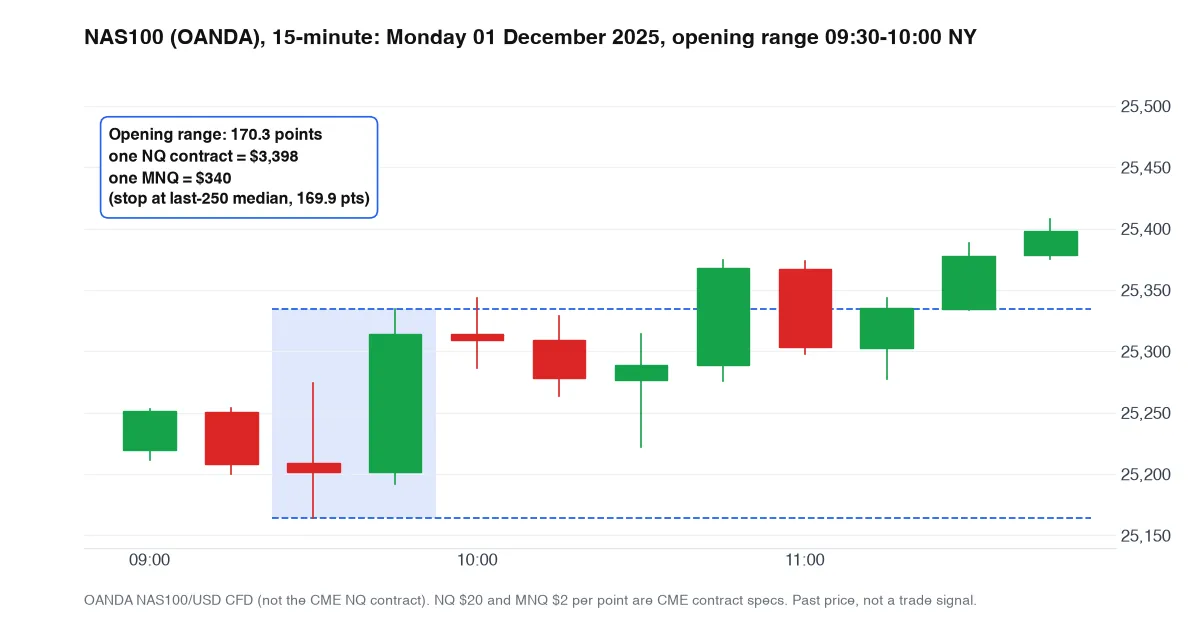 A real day close to the median: NAS100, 1 December 2025, range 170.3 points. Past price, not a trade signal.
Here's why points lie. We measured the first 30 minutes of the New York open on NAS100, using 15-minute OANDA candles over the last 250 complete trading days (20 August 2025 to 17 November 2026). The median range was about 170 points. A stop that wide costs $3,398 on one NQ contract and $340 on one MNQ. On a $5,000 account, that's 68% for the NQ. Same chart, very different night. The full test is in free futures trading simulators compared. It's OANDA CFD data, not CME, so treat it as a size check, not a signal.
Which Futures Backtesting Software Fits Which Trader
| If you are | Start with | Why | Check first |
|---|---|---|---|
| A scalper working inside the candle | NinjaTrader or Sierra Chart | Tick-level data and fine control over order handling | Whether replay needs a funded account or a higher package |
| A day trader on NQ or ES, rules on candle closes | Traders Journal or TradingView replay | 1-minute bars are enough, and you want to see the chart | Replay limits on your plan |
| A swing or positional futures trader | TradingView or QuantConnect | Daily and hourly bars are enough, and there's less to model | How the tool builds its continuous series |
| Building an automated system | NinjaTrader or QuantConnect | Strategy Analyzer or cloud backtests run the rule for you | The language: NinjaScript, or Python and C# |
| Already trading with TradeStation | TradeStation Strategy Tester | No new account, and EasyLanguage is built in | Data fees and account minimums |
| New to backtesting | Traders Journal free plan, then the next tool | Learn the habit before you buy depth | One symbol per session is a real limit |
Notice the pattern: depth costs setup, and ease costs depth. Neither is wrong. Just don't buy the depth before you've found out whether you'll finish a test.
Test a Rule in 10 Minutes on Traders Journal
Want to see how a rule behaves before you pick anything heavier? Here's the short version.
- Write the rule first. One sentence each for entry, stop and target.
- Open a backtesting session. Pick NQ, ES or YM and a past range.
- Replay and place trades. Step through the candles and take only the trades your rule allows.
- Add your costs. Knock your commission and a tick of slippage off each trade in the journal.
- Read the stats. Win rate, drawdown, profit factor. If it only works on ten trades, run it on a hundred.
Not ready to test yet? Practice the clicking first with a futures trading simulator. Following a strategy was never enough for me. I needed to know its normal drawdown and the trades worth skipping, and backtesting gave me that. It didn't make the strategy permanent. It showed where the rules had evidence and where they didn't.
Five Questions to Ask Before You Pay for Any of Them
- Can I run a full test before I pay? Free sims, free plans and trials let you finish one real test. A tool you can't try is a tool you're guessing about.
- What does it require first? A funded account, a brokerage login and a card are all real costs.
- Does it carry my contract and my sessions? Check NQ, ES, YM, crude or gold, and whether it knows the New York open.
- Can I get my results out? If the trades vanish when the session ends, you can't review them.
- Will I still use it in a month? The best tool is the one you open on a boring Tuesday.
A Checklist Before You Trust a Futures Backtest
Run any result through this before it changes how you trade:
- At least 50 to 100 trades, ideally a few hundred.
- At least five years of data, across trending, sideways and volatile stretches.
- Commissions and slippage switched on.
- The rule written down before the test, not tuned after it.
- A stretch of data you never looked at while building the rule.
- A known way the continuous series handles rolls.
- Your real contract size, so a stop shows up in dollars.
- Results reviewed trade by trade, not just the final curve.
Backtesting can't predict the next candle. It can tell you whether a rule had evidence before you put money behind it. If you can't tick most of these boxes yet, the test isn't finished.
So, Which Futures Backtesting Software Should You Use?
Whichever you pick, add your costs, test a few hundred trades, and keep some data you never touch. Want to know if your rule makes money before you risk it? Replay a futures session free. Premium details are on the pricing page, and the Traders Journal blog has the rest of the backtesting guides.
Backtesting won't make you profitable. It lets you be wrong cheaply, on a chart from 2022 instead of your account on Tuesday. That's the whole job.