What exactly is a paper trading simulator? It is a trading platform where the money is fake, the charts are real and the losses are free. Think of a flight simulator for your strategy: you can crash a hundred times before lunch and nobody sends you a margin call.
Traders Journal's paper trading simulator gives you two runways. Rewind to any day in history and trade it candle by candle, or trade today's live market with practice money on Super Charts. Either way, you learn what works while it still costs you nothing.
Start free, no card
Practice on real price history and live charts with fake money, and find out what works before it costs you a rupee or a dollar.
Best Paper Trading Simulators at a Glance
| Simulator | Practice on | Markets | Price | Worth knowing |
|---|---|---|---|---|
| Traders Journal | Past (replay) and live, in one account | Forex, gold, oil, crypto, CME index futures and Indian indices, plus US stocks and ETFs on live charts | Free to start. Premium $12/mo | No prop-firm evaluation mode yet |
| TradingView | Live paper trading, plus bar replay | Forex, futures, stocks and more | Paper trading free for all users. Replay limits vary by plan, check | Fills are simulated, not routed through a broker |
| MetaTrader 4/5 demo | Live | Spot forex and CFDs, via your broker | Free, unlimited | Fills are too clean, no real slippage |
| cTrader demo | Live | Forex and CFDs, with depth of market | Free, unlimited | Fewer brokers offer it |
| NinjaTrader simulator | Live | Futures | Free, no time limit, no funding | Live data needs a funded account or the 14-day data trial |
| Tradovate sim | Live | Futures, in the browser | 14-day free trial with real-time data | Check access after the trial |
| FX Replay | Past (replay) | Mainly forex, check | Free Beginner plan (2 sessions, 50 trades per session, 1 month max). Paid $17.99 or $35/mo billed monthly | Tight free plan |
| Forex Tester | Past (replay) | Forex, tick-level history | Paid, check vendor | Desktop software |
Checked against vendors' own pages on 10 to 11 November 2026 where they loaded (FX Replay, NinjaTrader, Tradovate, TradingView). "Free, unlimited" broker demos depend on your broker. Anything marked "check" wasn't confirmed against the vendor's page, so look before you commit. Prices move.
Quick picks
- Want to practice on the past and on today's market without juggling three tools? Traders Journal.
- Want to rehearse on your own broker's platform? Its MetaTrader or cTrader demo.
- Trading futures with a live feed? NinjaTrader's simulator.
- Drilling for a prop-firm evaluation? FX Replay.
What a Paper Trading Simulator Really Does
Think of it as Monopoly money with a candlestick chart. You get real prices, real order types and a balance that goes up and down, minus the part where your stomach drops.
It is good at three things:
- Learning the buttons. Plenty of traders lose their first few hundred dollars to the platform, not the market: wrong order type, lot size typed into the stop field, the classic. Better to fumble with fake money.
- Testing a rule. Does your entry actually work, or did it only look good on the three trades you remember?
- Practicing size. Seeing what 1 lot, or 2% of the account, does when the candle turns against you is a skill worth building before the money is yours.
It cannot test the one thing that blows most accounts: how you behave when the loss is real. Everyone is a monk holding a fake loser.
Past or present: the two ways to paper trade
Practice on the past (replay). Rewind to any historical day and trade it as the candles print. You get hundreds of trades in a weekend, because you skip the waiting.
Practice on today (live). Fake money on the live market, in real time. Slower, but it is the real clock, and the best test of whether you can sit still while a trade breathes.
A worked example. Say your setup is a pullback to the 20-period moving average on EUR/USD, 1-hour chart. On a live account you wait for price to touch that average, which might be twice this week or zero times, and then you wait some more. In a replay you ride through years of EUR/USD history and meet pullback after pullback in one sitting. Months of waiting, squeezed into a weekend.
Most traders need both, in this order: replay to find out whether the rule works, then live practice to see if you can follow it while the candle is still printing.
How to Paper Trade in Traders Journal
Replay a past market
- Start a session in a few clicks. Name it something you will recognise later ("EURUSD pullback practice"), pick a market from forex, futures, crypto, commodities or Indian markets, and set a practice balance that matches what you will really trade with.
- Pick the stretch of history you want to relive. A quiet trend, a news-day mess, the week everything went sideways. Your call.
- Trade it candle by candle. Hit play or step forward one candle at a time and place trades from the Buy/Sell panel on the chart. The future stays hidden, so no peeking.
- See what actually worked. Every session gives you P&L, win rate, Sharpe and max drawdown, so you can tell which setups paid and which just felt good.
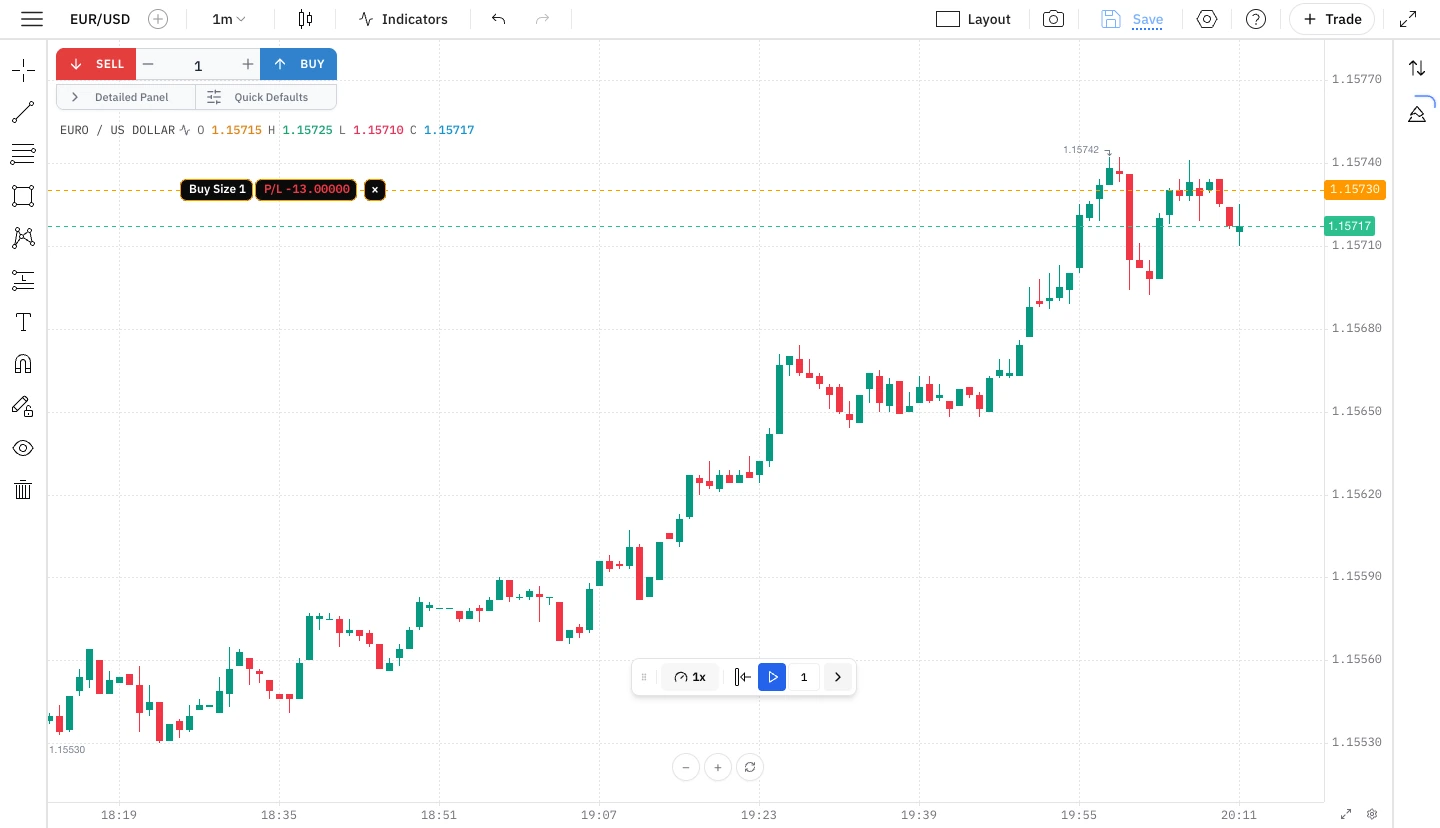 Replay mode: step through historical EUR/USD candles and trade them with the Buy/Sell panel, with an open paper trade showing live P&L.
Replay covers forex, metals, energy, crypto, and US and Indian index futures, with years of history. If futures are your focus, how we backtest NIFTY, BANKNIFTY and US index futures has the full market list, and the backtesting software page shows the workspace. To practise before you backtest, see the free futures trading simulators compared. New to the idea? Read what is paper trading.
Paper trade the live market on Super Charts
- Open Super Charts and pick a symbol from your watchlist: forex, gold, oil, crypto, US stocks and ETFs, all on live prices.
- Open the trade panel on the right of the chart.
- Choose Market, Limit or Stop, set your size, and add a stop loss and a target. The panel shows your estimated risk before you click, so there are no surprises after.
- Place the order and watch it breathe. Your position sits on the chart with live P&L, and your stop and target are one glance away in the Open Positions tab.
- Review how it went. Orders and Analytics show your win rate and drawdown, so you can tell skill from a lucky Tuesday.
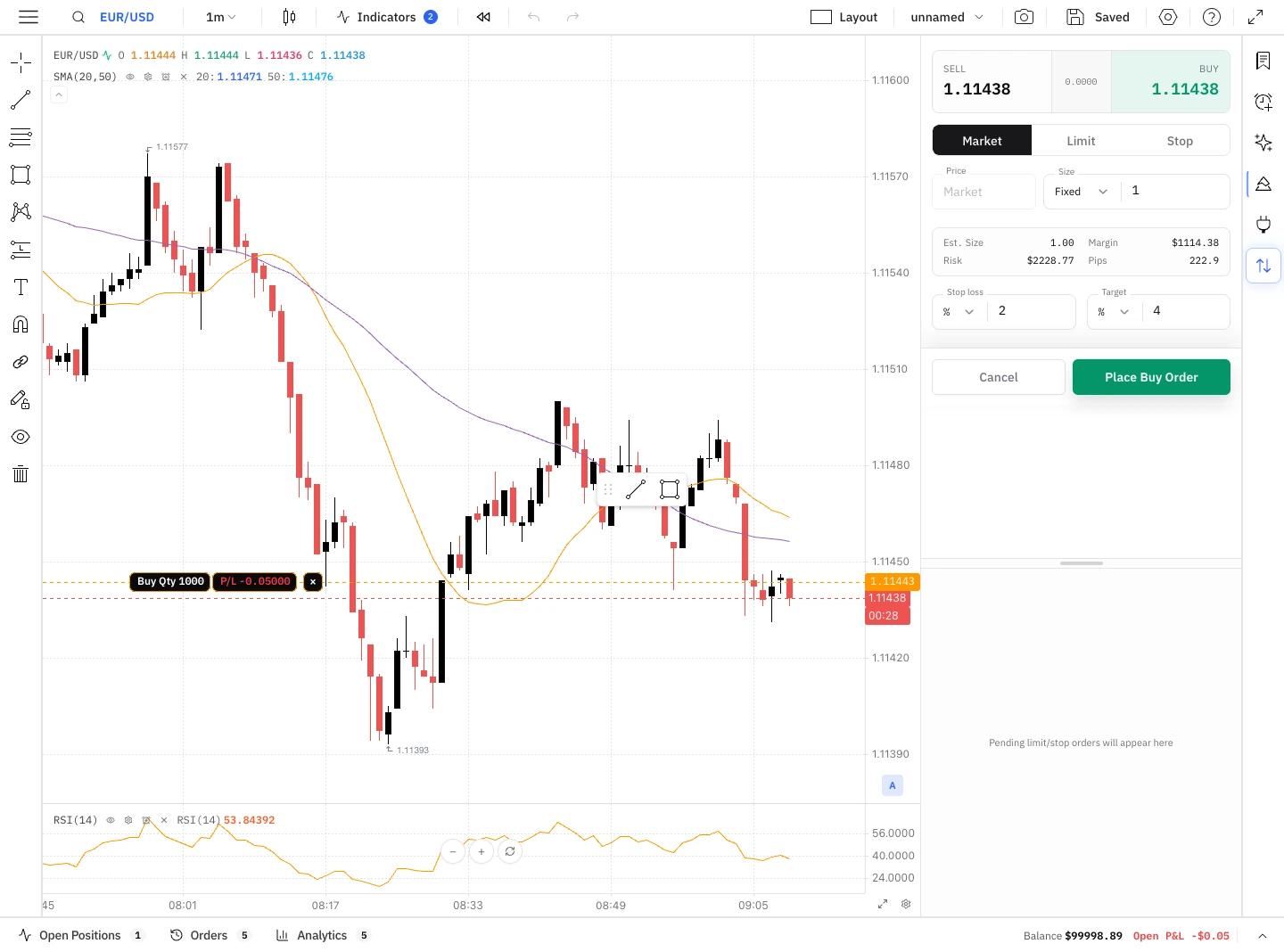 Live mode on Super Charts: Market, Limit and Stop orders with stop loss and target, and an open long position tracking live P&L.
Fair warning, true of every simulator including our paper trading simulator: paper fills are kinder than real ones, with no slippage and no requotes. Expect your live results to be a little worse, and you will not be shocked when they are.
Paper Trading Simulators by Market
Forex and CFDs
This is where most traders start, and where Traders Journal does the most. You can replay years of forex pairs and gold, then paper trade the same pairs live on Super Charts, all in one account.
Other places to practice:
- MetaTrader 4 and 5 demo. The industry default, via MetaTrader, and a sensible way to rehearse on your own broker's platform. It covers spot forex and CFDs, and the demo fills are famously clean: no slippage, no requotes during news, no broker pausing execution during NFP. You will trade better on demo than you do live.
- cTrader demo. Level II pricing and depth of market, so you see the order book, not just the top price. Fewer brokers run it, so check yours first.
- TradingView. Paper trading is free for all users (how it works), and bar replay (replay guide) lives inside the same charts. Fills are simulated, and replay limits vary by plan, so look before you rely on it. Our walkthroughs: how to paper trade on TradingView and how to backtest on TradingView, and the head-to-head: TradingView vs Traders Journal.
- FX Replay and Forex Tester. Replay-only tools for forex. FX Replay has prop-firm practice modes and a tight free plan (2 sessions, 50 trades per session, 1 month max), with paid plans at $17.99 or $35 a month billed monthly, per its pricing page. Forex Tester is paid desktop software with tick-level history. Full comparisons: FX Replay vs Traders Journal and Forex Tester vs Traders Journal.
Futures and indices
Replay CME E-mini futures (NQ, ES, YM) and the NIFTY and BANKNIFTY indices in Traders Journal, and rehearse entries on as many past sessions as you want before your first real contract.
If you want a live futures feed to practice on, NinjaTrader's simulator is free with no time limit and no funding needed. Live market data needs a funded account (any deposit) or the 14-day data trial. Tradovate runs in the browser with a 14-day free trial that includes real-time data. Check what access costs after the trial. CME Group, TradeStation and Interactive Brokers also offer simulators, though IBKR defaults to a huge virtual balance, which is poor practice for sizing a small account.
Crypto, gold and oil
Traders Journal covers crypto, gold, silver and oil in both modes: replay for history, and live charts for paper trades. Most broker demos stop at forex or futures, so this is where an all-in-one account saves you a tab or three.
Stocks, ETFs and options
Live charts in Traders Journal stream US stocks and ETFs for paper trades, and TradingView's paper trading covers stocks too. Traders Journal does not simulate options. If options are your focus, thinkorswim paperMoney, Webull and the Investopedia simulator are the usual picks, though we haven't verified their current balances or data delays, so check before you rely on them.
Paper Trading Mistakes (We Have All Made Them)
- Trading a million-dollar demo. If your real account is $2,000, practice on $2,000. Risking "1% of a million" feels nothing like risking 1% of yours.
- Redesigning the strategy after two losses. Two losses on fake money should change your rules exactly as much as two losses on real money. If you rebuild weekly, you never tested the first version.
- Heroic demo, frozen live. You hold a loser for three days on demo with total calm, then panic-close the same setup live. No simulator fixes that. Expect it, and the first real loss hurts less.
- Treating a lucky week as proof. A good week says the setup did not immediately fail. It does not say you have an edge.
- Waiting for live setups only. If your setup fires twice a week, you will spend six months on a ten-trade sample. Replay is how you get the other ninety trades.
- Never writing anything down. A paper account with no notes is a very expensive way to watch candles. Write the setup, the hesitation, and the moment you almost didn't take it.
- Quitting when live feels different. It will. Your hands get sweaty. That is normal, not a sign the practice failed.
How Long Should You Paper Trade Before Going Live?
Anyone who says "30 days" is guessing. Watch the market, not the calendar: your setup should have survived a trending stretch, a dead sideways stretch and at least one volatile one. Ten good trades prove very little, on paper or live. For most people it is weeks of consistent practice, not days.
A simple readiness check, no chart open:
- Can you write your entry rule in one sentence?
- Can you write your stop rule?
- Can you write your target rule?
- Has the rule held up across a few hundred replay trades, not just a lucky ten?
- Did you follow it on a live paper account for a few weeks, including the boring days?
Four yeses and a "kind of" means more reps, not a live account. The simulator is not the bottleneck at that stage. The rule is.
So, Which Paper Trading Simulator Should You Use?
Match the simulator to the question you are asking. Want to rehearse on your own broker's platform? Use that broker's demo. Want to know if a rule works, fast, and then practice it live without switching tools? That is what Traders Journal's paper trading simulator was built for: rewind the market, trade it, then trade today's market, all in one place and free to start.
Then do what almost nobody does: write down why you took each trade. It is boring in exactly the way flossing is boring, and it works for the same reason. Not sure where to write it? Start with the best free trading journal. Day trading specifically? Our best day trading simulators guide compares the intraday replay options. More on backtesting and journaling is on the Traders Journal blog.